APM WS Server

APM WS Server

API Reference
Current version 25R2-1.0 of September 4th 2025

APM WS Server is a standard interfaces exposed by ACS.
The bank is therefore client of ACS.

Thanks to this API the bank can manage  :

  • the trusted beneficiaries ;
    It is possible add, remove or get the trusted beneficiaries for a given cardholder

  • the merchants lists and categories;
    It is possible to set a category (Eligible Trusted beneficiaries, Secure Corporate, Level 1, etc.) for a given merchant.

  • the operands value used in APM rules engine;
    For example, it is possible to set the purchase amount threshold authorized based on Bank's ETV value 

Enable "on this page" menu on doc section
On

RBA API

RBA API

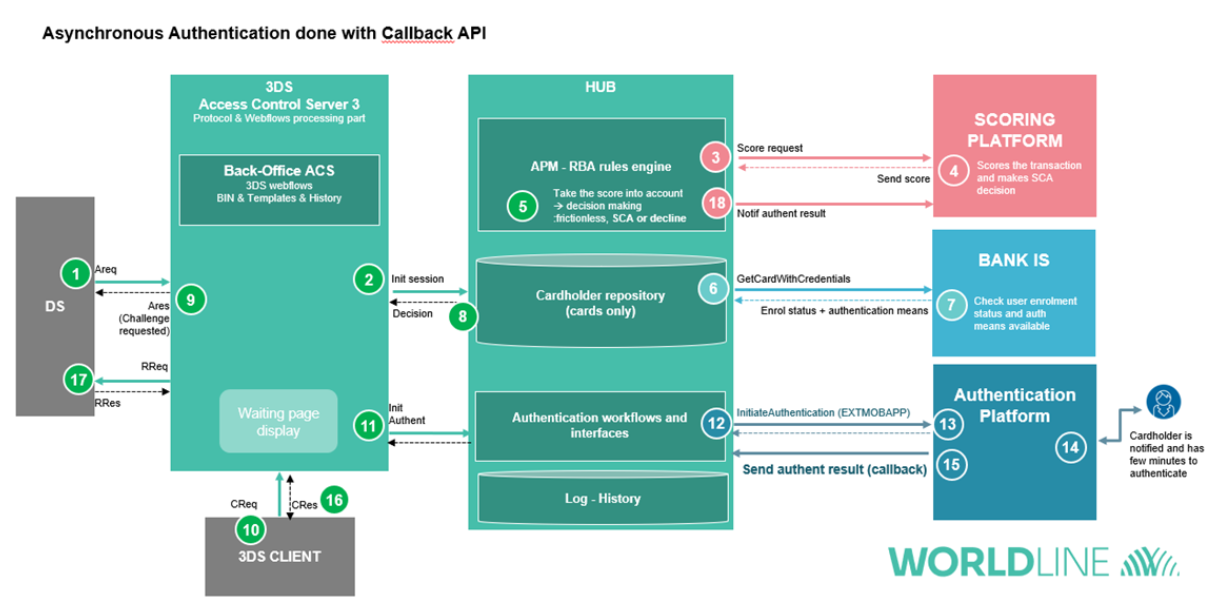
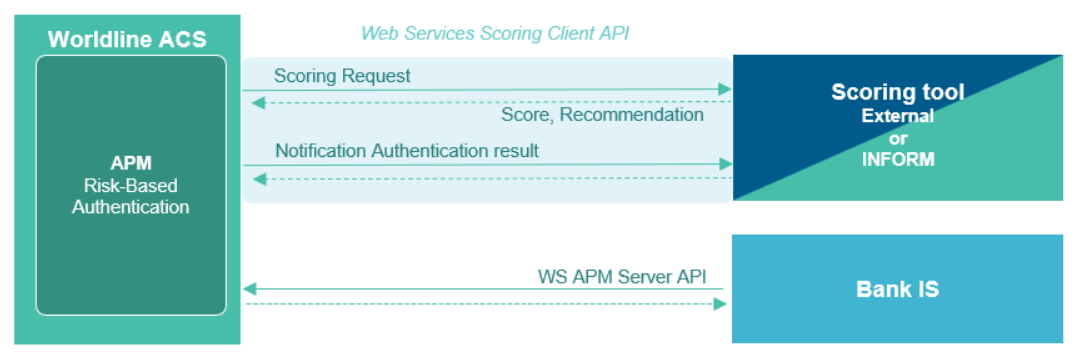
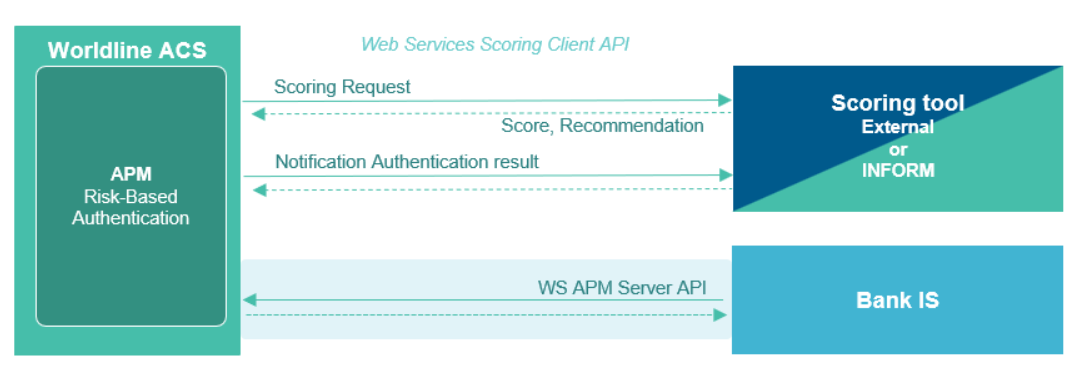
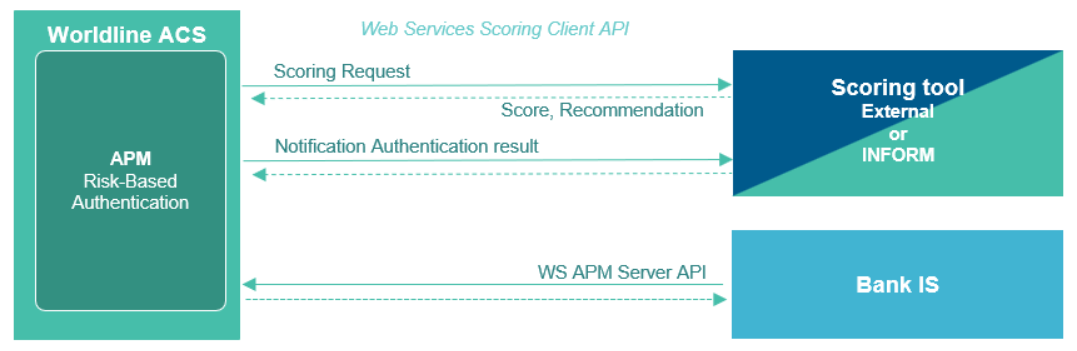
RBA Scoring API is the standard interfaces which is used to connect a Scoring platform to ACS.


Scoring platform provides a score, a recommendation and indicators, based on these information and ACS Rulesets, the APM rules engine takes an authentication decision (Frictionless, SCA or Decline)

Another standard WS APM interface, exposed by ACS, allows to manage the trusted beneficiaries, the merchants categories and the thresholds value used in APM rules engine;

Enable "on this page" menu on doc section
On

API generic page

WL ACS platform Standard APIs

VERSION 26R1 - last update Sept. 10 2025 

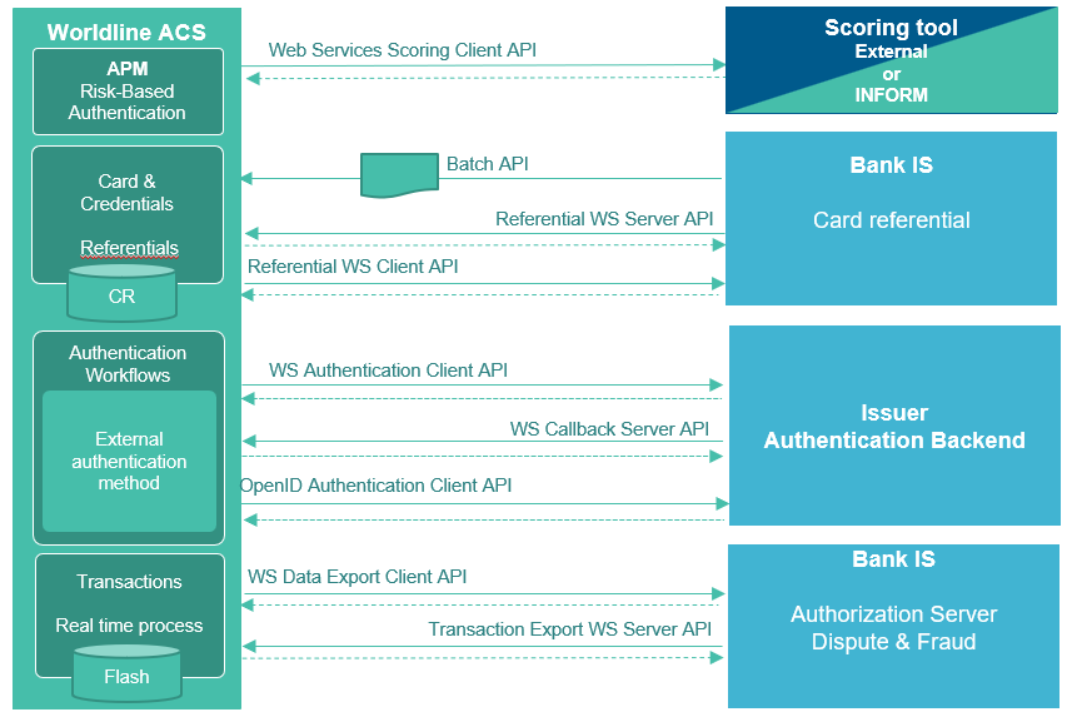
The ACS platform provides a set of APIs to manage and configure your ACS' Cardholder repository (cards, credentials, etc.), and to interface with your Bank’s information system or with your external authentication and scoring solutions. These APIs are standardized to enable rapid and easy integration.

These APIs can be grouped into four distinct domains:

  • Risk-Based Authentication (RBA) allows interfacing with a scoring platform (external or Riskshield Inform) and also provides the ability to update data used by the APM rule engine (ETV threshold, merchant category, etc.).
  • Card Referential manages the Cardholder repository by importing it via batch loads, in real time, or by real-time querying of the Bank’s information system.
  • Authentication enables initiating and validating an authentication managed by an external module outside the ACS platform.
  • Transactions allows to get a real-time export or retrieval of transaction information.
     

ACS API could be secure by using Oauth 2.0 protocol or mTLS.

Enable "on this page" menu on doc section
On

APM

List of changes

Version

Date

Update

Description

Author

23R3

May 5, 2023

Update

Added 3RI values to Split / Delayed Payment rule
Added 3RI Mastercard specific values

JB. Dupré

24R1

September 1, 2023

Update

Added new info for CIT Split transaction processing.

S. Kaghyan

24R2

February 23, 2024

Publish

No change

C. Wernette

24R3

June 27, 2024

Update

Added VISA DAF FIDO use cases

S. Cuq

25R1

September 5, 2024

Update

Added Card Testing Attack detection

S. Cuq

26R1

September 1, 2025

Update

Added VPP use cases

S. Cuq

Enable "on this page" menu on doc section
On

External RBA

VERSION 26R1 - last update Sept. 18 2025

This specification describes the features proposed by the module WL Authentication Process Management (APM) to process a Risk Based Authentication solution for 3D-Secure platform. 

1 Overview

With the enforcement of PSD2, article 97 requires that “Payment Service Providers to authenticate a user when they:

  • access an online payment account,
  • initiate an electronic payment transaction,
  • or carry out any action through a remote channel that may imply a risk of payment fraud”.

This new regulation will lead to an increase in Strong Customer Authentication. In order to provide a better user experience and to lower costs due to Strong Authentication, the Bank can choose a Risk Based Authentication (RBA). RBA is recommended by many regulations (PSD2) and schemes under the EMV 3DS 2.1 protocol.

WL APM is a functional extension of the ACS. New modules are added to be able to assess the risk of transactions. Thanks to the transaction risk analysis (TRA), the Bank can decide either to approve the authentication without SCA (frictionless flow), or ask for SCA (Challenge flow), or decline transaction if the risk is too high.

WL APM main goals are to:

- Check exemptions (RTS and others) and determine the right authentication workflow to process,

  • Implement RBA for payment and non-payment flows,
  • Manage authentication workflow for card based payments (3DS transactions) as well as PSD2 Access to Account use cases (PIS, AIS).
  • Propose a bank extranet which functionalities are included in the ACS back-office. 

WL APM is agnostic of any scoring platform. Therefore, RBA scoring can be done by Worldline Solution (Inform Riskshield), DS, Issuer Bank or by an external scoring tool.

WL APM is a modular solution which can process RBA and SCA for 3DS Secure flows.

APM functional architecture

                                                           Figure 1 : Overview of WL APM functional architecture

2 Functional description

During the initialization of an authentication request, WL ACS is in charge of:

  • Identifying the cardholder who has to be authenticated,
  • Checking the status of the cardholder,
  • Retrieving all the authentication methods available for the cardholder,
  • Providing this information to the Service Provider.

WL ACS also includes an additional module, the APM- RBA rules engine, which covers the following complementary features:

  • Check Standard Fraud prevention lists (e.g. black lists, white lists, ...),
  • Take into account fraud score and recommendation from external platform (DS, merchants, scoring platform, ...)
  • Apply Rules (From Bank, Scheme or regulatory framework) to make a decision,
  • Provide a Decision to the Service Provider.

Then, the Service Provider is able to make a decision and decide which authentication process to trigger:

  • Frictionless: acceptation of the authentication without any authentication action asked to the cardholder
  • Strong Customer Authentication: challenge asked to the cardholder
  • Decline: refusal of the authentication

APM decision process

                                                                        Figure 2: Overview of WL APM decision process

 2.1 Rules Engine

2.1.1 Workflow

The WL APM rules engine is a module which can apply specific rules, in a defined sequential order to establish a SCA decision.

The decision can take 3 results:

  • Frictionless : no authentication requested for the transaction,
  • SCA : Strong Customer authentication must be done, in this case strong authentication means available will be provided also to Service Provide
  • Decline: the transaction is too risky and must be declined.

WL APM provides a predefined standard set of rules. Then, the Bank chooses which rules or set of rules has to be activated depending on its strategy.

The rules list and the scheduling are defined by the Bank. It can be different depending on the use case (3DS, e-banking, Access to Account…).

APM Rules engine

                                               Figure 3: Overview of WL APM RBA Rules engine

Categories of rules

The rules engine can manage rules in part or in whole. It allows setting up:

  • The bank's own rules
  • The rules of the schemes
  • RTS exemptions (optional if managed on another bank system)
  • The rules related to the score
  • Bank specific rules
    • Blacklist of users, countries (user IP), phones, merchants
    • White list of users
    • Merchant pivot amount: list of merchants for whom strong authentication is mandatory above a defined threshold
  • Scheme rules
    • ID&V
    • VPP
    • BIN Attack
  • RTS Exemption Rules
    • Low value transactions (Amount < 30 € and cumulative amount of < 100 € or 5 consecutive frictionless transactions)
    • Analysis of the risks related to the transaction (amount between €30 and ETV and risk analysis)
    • Trusted beneficiaries
    • Secure Corporate
  • Rules related to the score:
    • Consideration of the recommendation of the scoring platform (frictionless, SCA, decline)
      • Interpretation of the score provided (value of the score + recommendation):
        • Either by the scoring platform
        • or by the directory server
      • Fallback

WL APM RBA parameters

Bank can choose, for example:

  • To activate or deactivate the WL APM RBA process
  • To activate or deactivate the call to the external Scoring platform
  • To take into account or ignore the scoring and recommendation from Directory Server
  • To take into account or ignore the scoring and recommendation from external Scoring platform
  • To define which scoring is most valuable between Scheme or external platform
  • To bypass the score request for a Scheme
  • To bypass the score request for virtual Cards
  • Value of threshold amount or threshold score
  • To activate or deactivate a rule
  • To change rule order (switch ordinal of two rules).
  • etc.

A new tool, called "Rules Creator", also allows for the creation and management of APM rules entirely independently via the Back-Office (cf. Back-Office User's guide).

In case of technical error or unavailability of the rules engine, it will answer back to the authentication workflow that a SCA has to be triggered.

Moreover, not to slow down the authentication process, a timer can be configured (e.g. DS asks to answer within 5 seconds on Areq/Ares message).

2.1.2 Definition of rules

2.1.2.1 Criterion

Transaction Data used as criterion in rules Engine are:

  • Amount of the transaction (converted in Bank's currency),
  • Score of the transaction
    • Provided by Scheme,
    • Provided by External Scoring Platform,
    • Provided by Issuer
  • SCA recommendation
    • Provided by Scheme,
    • Provided by External Scoring Platform,
    • Provided by Issuer
    • Provided by Merchant
  • Cumulative amount of consecutive frictionless transactions,
  • Number of consecutive frictionless transactions,
  • Threshold
    • ETV level amount (see § 6.1)
    • Frictionless amount threshold (30 EUR as defined by PSD2)
    • Minimum Score threshold
    • Maximum Score threshold
    • Specific Bank thresholds
  • Merchant Identity (Name) 
  • Merchant inclusion in Issuer’s List Merchant
  • Merchant country code
  • Acquirer country code
  • MCC includes in travel industry list (cf. Appendices)
  • Protocol version
  • Scheme
  • Brand
  • Secure corporate payment flag
  • Recurring and Instalment flag (1st transaction or a recurring n transaction)
  • 3RI flag
  • 3RI use case based on threeRIInd value
  • Message Category value (Payment / Non-Payment / 3RI)
  • threeDSRequestorChallengeInd
  • threeDSRequestorAuthenticationInd
  • MasterCard merchant fraud rate
  • Absence of score
  • Prior Reference Transaction is retrieved
  • Compare amount of prior and subsequent transaction
  • Compare currency of prior and subsequent transaction
  • MasterCard risk data – MasterCard “recommendation” and “reason code 1”
  • CB recommendation – “cbAction” data
  • VISA DAF fields ; authPayProcessReqInd, authPayCredStatus and dafAdvice
  • VISA VPP indicator
  • FIDO assertion or attestation control
  • PAN is card virtual ; boolean
  • Issuer Maintenance Mode activation on ACS platform ; boolean

Some criterion values depend on the transaction context. Others, like threshold are variable defined by the Bank in the rules engine module.

2.1.2.2 Rules

A rule is a list of operands which apply to criterion to make an action.

APM Rule definition

Available Operands are:

  • Equals
  • Lower [or equals]
  • Greater [or equals]
  • And
  • Or
  • Boolean
  • In

Actions are:

  • Fix decision value for a specific reason
  • Continue to next rules

2.1.2.3 Rules set

A rules set is a list of rules defined in an established order which defines the priority of the rules and the strategy of the bank to take a SCA Decision.

sample of ruleset

                                                                                Figure 4 - Example of Rules Profile

Rules set can be defined on Service, Issuer or Sub-Issuer Level. However, only one rules profile can be defined for a given Bank. If a sub-Issuer doesn’t have profile defined then the profile of its Issuer will be applied.

Specific rules set could also be defined based on optional information: 3DS Protocol Version (2.2 or 2.3.1), Network (VISA, MasterCard, CB, …), location (Merchant Country in or outside EEA) and deviceChannel (Browser Base, App base, 3RI)

In case of lot of rules set definition with intersection, the rules to apply is retrieved base on the priority order below:

  1. service: required
  2. issuer: required
  3. subIssuer: optional
  4. location: (Merchant Country - EEA) optional
  5. Network optional
  6. Protocol Version optional
  7. deviceChannel: optional

2.1.2.3 Rules configuration

The bank can modify the existing rules directly via the API and ACS back-office or via integration project depending on the complexity of the change expected.

 2.2 PSD2 RTS requirements

SCA exemptions are based on the level of risk, amount, recurrence and the payment channel used for the execution of the payment. These exemptions allow PSPs to achieve the right balance between convenience of the payment experience and fraud reduction

WL APM includes a Rules engine and Risk-Based Authentication compliant with PSD2 RTS and schemes requirements to check SCA exemptions.

By default, the WL APM module includes the following rules:

  • Check acquirer location
  • Check amount vs minus threshold (by default 30 euros)
  • Check cumulative amount since last SCA (by default 100 euros)
  • Check number of transaction since last SCA (by default 5 transactions)
  • Check amount vs issuer ETV
  • Check RBA risk value (low / medium / high)
  • Check if recurrent transaction
  • Check Acquirer Exemption
  • Check 3RI Use Cases

The following rules are out of the scope of the 1st version of WL APM:

  • Check if beneficiary is the payee (out of 3DS scope)

PSD2 RTS                                       Figure 5 – Application of PSD2 RTS Rules – arts 16 and 18

WL APM manages exemptions which apply to 3DS flows. Here are the detailed rules:


Concerned flows

Exemption

Rules

Conditions of the exemption

Implementation

3DS

Art 13 Trusted beneficiaries

SCA applies when the user creates or modifies a list of trusted beneficiaries through the payer’s account servicing PSP

Exemption if the payer initiates a payment transaction and the payee is included in a list of trusted beneficiaries previously created by the payer.

See TML

3DS

Art 14 Recurring transactions

SCA applies when a payer creates, amends or initiates for the 1st time, a series of recurring transactions with the same amount and with the same payee

Exemption for the initiation of all subsequent payment transactions included in the series of payment transactions

See recurring payment

3DS

Art 16 Low-value transactions

Exemption of SCA according to the following conditions:

1 – the amount of remote electronic payment transaction does not exceed EUR 30, AND

2 – the cumulative amount of previous remote electronic payment transactions initiated by the payer since the last application of SCA does not exceed EUR 100, OR

3 – the number of previous remote electronic payment transactions initiated by the payer since the last application of SCA does not exceed 5 consecutive individual remote electronic payment transactions

See low value transaction

3DS

Art 17 Secure corporate payment processes and protocols

Exemption of SCA in respect of legal persons initiating electronic payment transactions through the use of dedicated payment processes and protocols that are only made available to payers who are not consumers, where the competent authorities are satisfied that those processes or protocols guarantee at least equivalent levels of security to those provided by Directive (EU) 2015/2366


See secure corporate payment

3DS

Art 18 Transaction risk analysis

SCA exemption if the PSP considers the remote electronic payment as posing low level of risk according to the transaction monitoring mechanisms

1 – the fraud rate for this type of transaction is equivalent to or below the reference fraud rates specified in the table set out in the annex for “remote electronic card-based payments” and “remote electronic credit transfers” respectively

2 – the amount of the transaction does not exceed the ETV specified in the table set out in the annex

3 – PSP have not identified risky elements further to the real time risk analysis they have done (6 elements to be checked by the scoring tool + 4 risk-based factors to be taken into account)

See acquirer exemption

3DS

Art 19 Calculation of fraud rates

For each type of transaction, the PSP shall ensure that the overall fraud rates covering both payment transactions strongly authenticated or exempted are equivalent to or lower than the reference fraud rate for the same type of payment transaction indicated in the table set out in annex.

The ETV has to be updated every 90 days


API provided to update the ETV + ETV value history

3 White & Black lists

This function allows managing standard fraud prevention lists. You can access it via the navigation banner by selecting the heading <Fraud>.

Black lists

Fraud is controlled in real time for each transaction thanks to the fraud parameters which have been entered in the ACS3 Back Office.

The available fraud functions on the platform are:

  • Cards in white/black lists,
  • Cards in exemption lists,
  • Blacklisted authentication mean
  • IP filters
  • Blacklisted merchants (URL, Name, ...)
  • Country blacklist (cardholder IP)
  • Fraud lists search

 3.1 Cards in white/black or exemption lists

This function is used to:

  •  Search for a whitelist or blacklist card
  •  Add a card to the blacklist, whitelist or exemption list
  • Delete a card from the blacklist or the whitelist.

Business rules :

  1. When a card is blacklisted, the card is blocked for all authentication requests. A blacklisted card will neither be able to perform a challenge nor participate in frictionless authentication.
  2. When a card is whitelisted, it benefits from an exemption, allowing it not to be affected by merchant-based, country-based and IP-based blacklists.
  3. When a card is placed on the exception list, it is identified as such and can therefore have rules specific to the ACS authentication profile.

 3.2 Blacklisted means

This function is used to:

  • Search for the presence of an authentication mean in the blacklist via the phone number or the e-mail address
  • To add an authentication mean in black list
  • Delete a blacklisted authentication mean.

Business rules :

  1. When a mean (phone number or email address) is blacklisted, it is automatically retired from the list of available credentials. 
  2. If the blacklisted credential is the only credential available, the associated authentication method is revoked for the current transaction.
  3. An authentication mean can be blacklisted for a determined period or indefinitely.
     

 3.3 IP filters

This function allows you to:

  • Look for the existence of a IP filter
  • Add an IP filter to a blacklist
  • Delete an IP filter from the black list.

Business rules :

  1. If the Cardholder IP address of the transaction is in a blacklisted range, the authentication is declined.
  2. The IP filter can be applied to the instance, or the issuer and its sub-issuers or to one sub-issuer.
  3. The IP filter can be limited to an IP address, to an IP range or to an IP address mask.

 3.4 Blacklisted merchants

This merchant black list is based on the following information:

  • The merchant URL, name, id or domain
  • The cardholder IP country who makes his purchase on the merchant website (Geo-location)
  • A threshold amount and its direction (>= / <=)

These 3 pieces of information are managed by the rules engine.

The first piece of information is transmitted in the PAREQ or AREQ messages sent by the merchant.

The user can carry out the following actions via the back-office:

  • View the blacklisted merchants
  • Add a merchant in the black list
  • Delete a merchant from the black list

Business rules :

  1. If the merchant data refers to one of the blacklisted merchant lists, the authentication is declined.
  2. The Merchant blacklist can be applied to the instance, or the issuer and its sub-issuers or to one sub-issuer.
  3. The Merchant blacklist  can be defined for a merchant URL, merchant name or a merchant domain.

 3.5 Country Blacklist

This function allows:

  • Access to the blacklist of countries (IP cardholder)
  • Add a country to the blacklist
  • To modify the pivotal amount above which transactions are refused
  • To delete a country from the black list.

Business rules :

  1. When a country is blacklisted, all transactions from that country are rejected if the amount of the transaction is greater than the amount set for the country.
  2. The country is detected from the IP address of the cardholder.
  3. The country blacklist can be applied to the instance, or the issuer and its sub-issuers or to one sub-issuer.


4 Merchants List

On APM rules engine is possible to define a rule for a limited list of merchants. To do that, the rule must include an operator which checks Merchant inclusion in Issuer’s List Merchant for a specific category flag.

The check is done based on the merchant name, field “merchantName” in protocol 2. The name of the merchant defined in the ACS list must be strictly equals to the name provided in the 3DS.

The list could be defined on Instance, Issuer or Sub-Issuer Level.

The list of merchant is limited to 500 merchants.

Each merchant is included in specific categories. A merchant could be flagged in 1 to N categories.

The available categories are:

  • Secure Corporate
  • Trusted Beneficiaries ACS
  • Trusted Beneficiaries 3DS Server
  • Delegated Authentication
  • TRA
  • Risk
  • Level 1 to 5

The APM rule condition will be for example:

merchantName ∈ {Merchants List flagged “Secure Corporate”}

Merchants List could be managed in ACS BO or via standard Public RBA API

5 Exonerating hint 

If an external scoring platform is configured for a Customer, then the logic comes as described below:

  • During AReq processing, a Scoring request is sent to scoring platform
  • After the ARes message (Frictionless) or RRes message (Challenge), a Notification request (Advice) is sent to scoring platform

A score (authScore) and a decision (authIndicator) are returned in score response message.
It is also possible for an external scoring platform to provide an RBA reason using generic field exoneratingHint. 
 

If the exonaratingHint contains an existing valid Reason (cf. reason types list)
then APM could returns this value to ACS platform which triggers the transStatus and transStatusReason values accordlingly.

APM must be configured with a single rule to apply the Scoring recommentation :

  • decision = EXTRBADECISION
  • reason = EXT_RBA

exonerating hint

The APM configuration to handle the exoneratingHint field and the overriding logic is defined in the table below:

Name

Condition

Exonerating Hint

ReasonType

Use case 1

rbaReason = EXT_RBA

and

exoneratingHint = HIGH_SCORE

and

rbaDecision = SCA

HIGH_SCORE

HIGH_SCORE

Use case 2

rbaReason = EXT_RBA

and

exoneratingHint = HIGH_SCORE

and

rbaDecision = FRICTIONLESS

HIGH_SCORE

EXT_RBA 
because HIGH_SCORE must be linked to AuthType = SCA, the couple FRICTIONLESS/HIGH_SCORE is not authorized

Use case 3

rbaReason = EXT_RBA

and

exoneratingHint = ANY_UNKNOWN_LABEL

and

rbaDecision = FRICTIONLESS

ANY_UNKNOWN_LABEL

EXT_RBA 

because ANY_UNKNOWN_LABLE is a not included in authorized RBA reasons list

In summary, if APM is configured to use the Scoring platform decision as received, then the rbaReason returned to ACS must be the externalRBA Reason, i.e., if rbaReason = EXT_RBA

Enable "on this page" menu on doc section
On

Rules Engine – List of Operands & Reasons

VERSION 26R1 - last update Sept. 18 2025

1. Purpose of this page

WL APM Rules Engine is a functional extension of the HUB.

New feature are added in RBA Module to be able to assess the risk of transactions. Thanks to the transaction risk analysis (TRA), the HUB will provide a decision to ACS and Banks can decide either to approve the authentication without SCA (frictionless flow), or ask for SCA (Challenge flow), or decline transaction if the risk is too high.

WL APM main goals are to:

  • Check exemptions (PSD2 RTS and others) and determine the right authentication workflow to process,
  • Implement RBA for payment flows,
  • Propose a bank extranet which functionalities are included at the beginning in the ACS back-office.

WL APM is agnostic of any scoring platform.

The main goal of this document is to give the exhaustive list of :

  • Operand usable to define specific conditions in rules,
  • Reason linked to a decision for a specific use case


2. Operands List


  2.1 Protocol operands

OperandName

Description

OperandType

Comment

Version

AUTHENTICATION_INDICATOR

3DS Requestor Authentication Indicator

EQUALS

Check value of threeDSRequestorAuthenticationInd

21R2

ACQ_SCA_REQ

Acquirer requirement for SCA.

BOOLEAN

trueif threeDSRequestorChallengeIndis in list (03,04,12,13,14)

20R3

ACQ_IN_EEA

Acquirer is in EEA 

BOOLEAN

trueif acquirer Country code is in EEA (cf. Appendices). 
Notes, it’s possible to extend EEA country list.

23R1

ATTACK_ALERT_INSTANCE_
SCORE_PPM

Instance score threshold

STRICTLY_ABOVE

STRICTLY_UNDER

Compare the instance score (last update received) threshold in ppm (parts-per-million)

24R3

ATTACK_ALERT_PATTERN_
WEIGHT_PPM

Pattern weight of the matched alert threshold

STRICTLY_ABOVE

STRICTLY_UNDER

Compare the pattern weight of the matched alert (the highest pattern weight if multiple matches) threshold in ppm (parts-per-million)

24R3

BRIDGING_EXTENSION

Bridging message extension available

BOOLEAN

trueif a BME is provided in AReq message

23R2

CARD_TYPE

Card type control

EQUALS

Check value of card type defined on BIN range

1 = CREDIT 

2 = DEBIT

23R1

DEVICE_CHANNEL

Transaction Device Channel

EQUALS

check deviceChannel value, as a reminder values accepted:

• 01 = App-based (APP)

• 02 = Browser (BRW)

• 03 = 3DS Requestor Initiated (3RI)

23R1

DS_CARD_SCHEME

Directory Server used by Transaction

EQUALS

Check the DS network value. Values accepted :

MASTERCARD

VISA 
CB

BANCONTACT


EQUALITY_AMOUNT

Amount equality.

EQUALS

Compare the purchase amount converted in euro with a fix value (value in cents euro)


FRICTIONLESS_TRN_COUNT

Count of last successive frictionless transactions.

STRICTLY_ABOVE

STRICTLY_UNDER

Compare the counter of cumulative frictionless transaction with a given threshold (value in cents euro)

*

FRICTIONLESS_TRN_
TOTAL_AMOUNT

Total amount of last successive frictionless transactions.

STRICTLY_ABOVE

STRICTLY_UNDER

Compare the cumulative frictionless transaction’s amount converted in euro with a given threshold (value in cents euro)

*

MATCH_ATTACK_ALERT_TYPE

Type of ongoing attack alerts matching the transaction

IN

Among the available alerts types :

  • BIN

24R3

MATCH_BIN_ATTACK_ALERT

A BIN Attack is detected by WL AI detection program

BOOLEAN

trueif an attack is detected and always ongoing and the current transaction matches the attack

25R2

MAINTENANCE_MODE_REF

Maintenance mode activated

BOOLEAN

trueif the request data has the “maintenance mode” flag set ON meaning maintenance mode is activated on BO ACS

23R1

MESSAGE_CATEGORY

Identifies the category of the message for a specific use case. 

EQUALS

check messageCategory value, as a reminder values accepted:

• 01 = PA

• 02 = NPA

21R2

NO_THREE_DS_
CHALLENGE_IND

No Challenge indicator

BOOLEAN

trueif threeDSRequestorChallengeInd is not provided in AReq message


PROTOCOL_VERSION

An operand that is associated with “protocolVersion” field

EQUALITY

STRICTLY_ABOVE

STRICTLY_UNDER

Compare the protocol version. Version must be defined as a number on 3 digits, ex. 220 = 2.2 or 231 = 2.3.1

22R1

SEC_CORPORATE

Payment marked as secure corporate.

BOOLEAN

true if 

- secureCorporatePayment = "Y” in MC extension

OR

- threeDSRequestorChallengeInd= 82 for VISA

OR

- threeDSRequestorChallengeInd = 11

20R3

THREE_DS_CHALLENGE_IND

3DS challenge indicator

EQUALS

Compare the value of threeDSRequestorChallengeInd to one constant 

21R2

THREE_DS_REQ_
AUTH_METHOD

3DS requestor authentication method

EQUALS

Compare the value of threeDSReqAuthMethod to one constant

24R2

THREE_DS_REQUESTOR_ID

3DS requestor ID

EQUALS

Compare the value of threeDSRequestorID to a string 
for example = "10075338*CLICKTOPAY"

25R1

THREE_RI_CARDINFO

3RI maintain card info request.

BOOLEAN

true if threeRIInd equals 04 or 05

20R3

THREE_RI_DECOUPLED

3RI decoupled payment.

BOOLEAN

true if threeDSRequestorDecReqInd = Y

20R3

THREE_RI_IND

Indicates the type of 3RI request

EQUALS

Compare the value of threeRIInd to one constant 

21R2

THREE_RI_IND_IN

Indicates the type of 3RI request

IN

Check if the value of threeRIInd is included in a list.

24R1

THREE_RI_MOTO

3RI Mail Order or Telephone Order

BOOLEAN

true if threeRIInd equals 08 or 09


THREE_RI_WHITELIST

3RI white list Boolean check.

EQUALS

true if threeRIInd equals 10

use preferably THREE_RI_IND


THRESHOLD_AMOUNT

Amount threshold.

STRICTLY_ABOVE

STRICTLY_UNDER

Compare the purchase amount converted in euro with a given threshold (value in cents euro)

*

VIRTUAL_CARD

Denotes whether card, that is supposed to be used in the condition, should be virtual (vPAN) or not.

BOOLEAN

true if Card used for purchase is a virtual card

23R1

WHITELIST

White list Boolean.

BOOLEAN

true if 

- Merchant is in Trusted Merchant list of the PAN

- White List Source is the expected one

- Merchant is always eligible for White Listing for the issuer

*

WHITELIST_STATUS_SOURCE

Identifies the white list Boolean source (ACS, 3DSServer, DS)

EQUALS

Compare the value of whiteListStatusSourceto a numeric value. Values accepted:

• 01 = 3DS Server

• 02 = DS

• 03 = ACS

21R2

THRESHOLD_MERCHANT_TOP_LEVEL

Replaced by merchant categories

STRICTLY_ABOVE

STRICTLY_UNDER

DEPRECATED - do not use anymore

use Merchant operands


EQUALITY_MERCHANT_TOP_LEVEL

Replaced by merchant categories

EQUALS

DEPRECATED - do not use anymore

use Merchant operands


ACQ_EXEMPTION

Use control based on Challenge indicator or exemption values

BOOLEAN

DEPRECATED - do not use anymore

use THREE_DS_CHALLENGE_IND operands


MERCHANT_MCC

Do not use

BOOLEAN

DEPRECATED - do not use anymore


The table below contains operands currently in use. The operand name must be one of the listed in the table, and must be used with corresponding operand type.


  2.2 Score operands

OperandName

Description

OperandType

Comment

Version

ACTION_CODE

Field returned by the external scoring platform along with the score.

EQUALS

Compare the value of authIndicator to one constant

• 0 - SCA required

• 1 - No SCA required

• 2 - Decline authentication request

• 10 - SCA optional (according to risk score)

*

BIN_ATTACK

BIN Card testing attack identified by the external scoring platform

BOOLEAN

true if the scoring response returns an incriminating hint text which contains "BIN Attack" (no case sensitive),

25R1

DECISION_FRICTIONLESS

Initial decision (before rule engine) launch equalsFRICTIONLESS.

BOOLEAN

true if the highest priority decision (defined in APM configuration) is frictionless

21R1

DECISION_SCA

Initial decision (before rule engine) launch equals SCA.

BOOLEAN

true if the highest priority decision (defined in APM configuration) is challenge

21R1

DECISION_DECLINE

Initial decision (before rule engine) launch equals DECLINE.

BOOLEAN

true if the highest priority decision (defined in APM configuration) is decline

21R1

NO_SCORING_INFO

No score has been provided by scoring platform(s) or DS

BOOLEAN

true if APM doesn’t get any highest priority score from all scoring platforms configured

21R2

THRESHOLD_

SCORE

Score threshold.

STRICTLY_ABOVE1

STRICTLY_UNDER

Compare the highest priority score with a given threshold

*

THRESHOLD_

DS_ISSUER_SCORE 

DS Issuer Score threshold.(DS CB only)

STRICTLY_ABOVE

STRICTLY_UNDER

Compare the DS Issuer score with a given threshold


THRESHOLD_

DS_SCORE 

DS Score threshold.

STRICTLY_ABOVE

STRICTLY_UNDER

Compare the DS score with a given threshold


THRESHOLD_

EXTERNAL_ISSUER_SCORE 

External Issuer Score threshold.(STETonly)

STRICTLY_ABOVE

STRICTLY_UNDER

Compare the external issuer score with a given threshold


THRESHOLD_

EXTERNAL_SCORE 

External Score threshold.

STRICTLY_ABOVE

STRICTLY_UNDER

Compare the external score with a given threshold


THRESHOLD_

ISSUER_SCORE

Issuer Score threshold.

STRICTLY_ABOVE

STRICTLY_UNDER

Compare the issuer score with a given threshold


FIRST_SCA

First payment on a new card

BOOLEAN

true if on a new card or once feature SCA_FOR_FIRST_TRN is activated, the transaction is the first one 

24R2


[1] If the “Reversed” flag is TRUE, the operator is reversed. E.g. the “STRICTLY_ABOVE” operator becomes LESS_THAN_OR_EQUAL_TO.

  2.3 Merchant operands

OperandName

Description

OperandType

Comment

Version

MERCHANT_

SECURE_CORPORATE

Merchant is defined in category

‘Secure Corporate’

BOOLEAN

true if transaction merchant id, url, name or mcc is included in ‘Secure Corporate’ Merchant List

21R2

MERCHANT_

BLACKLISTED

Merchant blacklisted.

BOOLEAN

true if Merchant is black listed in ACS platform

*

MERCHANT_

TRUSTED_BENEFICIARIES_ACS

Merchant is defined in category

‘Trusted Beneficiaries ACS’

BOOLEAN

true if transaction merchant id, url, name or mcc is included in ‘Trusted Beneficiaries ACS’ Merchant List

21R2

MERCHANT_

TRUSTED_BENEFICIARIES_3DS_SERVER

Merchant is defined in category

‘Trusted Beneficiaries 3DS SERVER’

BOOLEAN

true if transaction merchant id, url, name or mcc is included in ‘Trusted Beneficiaries 3DS SERVER’ Merchant List

21R2

MERCHANT_

DELEGATED_AUTHENTICATION

Merchant is defined in category

‘Delegated authentication’

BOOLEAN

true if transaction merchant id, url, name or mcc is included in ‘Delegated authentication’ Merchant List

21R2

MERCHANT_TRA

Merchant is defined in category

‘TRA’

BOOLEAN

true if transaction merchant id, url, name or mcc is included in ‘TRA’ Merchant List

21R2

MERCHANT_RISK

Merchant is defined in category

‘RISK’

BOOLEAN

true if transaction merchant id, url, name or mcc is included in ‘RISK’ Merchant List

21R2

MERCHANT_LEVEL_1

Merchant is defined in category

‘LEVEL 1’

BOOLEAN

true if transaction merchant id, url, name or mcc is included in ‘LEVEL 1’ Merchant List

21R2

MERCHANT_LEVEL_2

Merchant is defined in category

‘LEVEL 2’

BOOLEAN

true if transaction merchant id, url, name or mcc is included in ‘LEVEL 2’ Merchant List

21R2

MERCHANT_LEVEL_3

Merchant is defined in category

‘LEVEL 3’

BOOLEAN

true if transaction merchant id, url, name or mcc is included in ‘LEVEL 3’ Merchant List

21R2

MERCHANT_LEVEL_4

Merchant is defined in category

‘LEVEL 4’

BOOLEAN

true if transaction merchant id, url, name or mcc is included in ‘LEVEL 4’ Merchant List

21R2

MERCHANT_LEVEL_5

Merchant is defined in category

‘LEVEL 5’

BOOLEAN

true if transaction merchant id, url, name or mcc is included in ‘LEVEL 5’ Merchant List

21R2

MCC_TRAVEL_INDUSTRY

MCC corresponding to travel industry

BOOLEAN

true if MCC is included in travel industry List. Cf. Appendices

22R3

  2.4 Recurring / Instalment / Split operands

OperandName

Description

OperandType

Comment

Version

AMOUNT_IND

Indicates whether the recurring or instalment payment has a fixed or variable amount

BME + new Protocol 2.3.1 field

EQUALS

Compare the value of amountInd to one constant

Values accepted:

• 01 = Fixed Purchase Amount

• 02 = Variable Purchase Amount

23R1

EQUALITY_RECURRING_AMOUNT

Recurring amount in minor units of currency with all punctuation removed.

EQUALS

Compare the value of recurringAmount to one constant

23R1

FIRST_INSTALMENT

First payment in a series of installment payments.

BOOLEAN

true if

- threeDSRequestorAuthenticationInd = 03

- prior recurring transaction info is empty

- recurringAmount, recurringCurrency, recurringExpiry, recurringFrequency and purchaseInstalData are provided by Merchant

- since 2.2 BME / 2.3.1, recurringDate and recurringInd can be requested

20R3

FIRST_RECURRING

First payment in a series of recurrent payments.

BOOLEAN

true if

- threeDSRequestorAuthenticationInd = 02

- prior recurring transaction info is empty

- recurringAmount, recurringCurrency, recurringExpiry, recurringFrequency are provided by Merchant

- since 2.2 BME / 2.3.1, recurringDate and recurringInd can be requested

20R3

FREQUENCY_IND

Indicates whether the recurring or instalment

payment has a fixed or variable frequency

BME + new Protocol 2.3.1 field

EQUALS

Compare the value of frequencyInd to one constant

Values accepted:

• 01 = Fixed Frequency

• 02 = Variable or Unknown Frequency

23R1

INSTALMENT

Subsequent payments in a series of installment payments following the first payment.

BOOLEAN

true if

- threeDSRequestorAuthenticationInd = 03

- prior recurring transaction exists

- subsequent amount <= prior amount

- number of subsequent trn is < purchInstalData

20R3

PRIOR_AUTHENT_IND

Authentication value of Prior SCA Transaction

EQUALS

Compare the value of threeDSRequestorAuthenticationInd from the initial transaction to one constant

24R1

PRIOR_AMOUNT_EQ

Operand with prior amount Equity checking (Boolean wise)

BOOLEAN

true if Amount of prior SCA transaction equals recurringAmount of subsequent transaction. Also check that currency doesn’t change.

23R1

PRIOR_AMOUNT_LEQ

Operand with prior amount comparison using “less or equal” (and “greater than”) logic

BOOLEAN

true if recurringAmount of subsequent transaction is less or equal to Amount of prior SCA transaction. Also check that currency doesn’t change.

23R1

PRIOR_AMOUNT_

INCREASE_PERCENT

Maximum amount increase for a recurring transaction with variable amount

STRICTLY_UNDER

Check if the increase between recurringAmount and prior transaction amount in under a fix percent value

24R1

PRIOR_CURRENCY

Currency of first SCA transaction is equals to currency of subsequent transaction

BOOLEAN

true if recurringCurrency equals prior transaction currency

23R1

PRIOR_REFERENCE

A prior transaction is existing.

BOOLEAN

true if prior transaction is retrieved

Search is done based on

acsTransID for VISA

dsTransID for MasterCard/ Bancontact

23R1

RECURRING

Subsequent payments in a series of recurrent payments following the first payment.

BOOLEAN

true if

- threeDSRequestorAuthenticationInd = 02

- prior recurring transaction exists

- subsequent amount = prior recurring amount

- frequency is correct : check the minimum number of days between authorisations

20R3

RECURRING_DATE

Effective date of new authorized amount following first/promotional payment in recurring transaction

BME + new Protocol 2.3.1 field

EQUALS

Compare the value of recurringDate to one date, format

YYYYMMDD

23R1

RECURRING_CURRENCY

Currency in which recurring amount is expressed

BME + new Protocol 2.3.1 field

EQUALS

Compare the value of recurringCurrency to a currency numeric code - ISO 4217

23R1

THREE_RI_INSTALMENT

Subsequent payments in a series of installment payments following the first payment.

BOOLEAN

true if

- threeRIInd = 02

- prior recurring transaction exists

- subsequent amount <= prior amount

- number of subsequent trn is < purchInstalData


THREE_RI_RECURRING

Subsequent payment in a series of recurrent 3RI payments with fix frequency and fix amount.

BOOLEAN

true if

- threeRIInd = 01

- prior recurring transaction exists

- subsequent amount = prior recurring amount

- frequency is correct : check the minimum number of days between authorisations

20R3

SPLIT_TRN_STATUS

Split payment or Split shipment or Delayed shipment

BOOLEAN

true if

- threeRIInd = 06, 11, 15, 16 or for MasterCard (85, 86) or for VISA (80)

- prior transaction exists
- prior transaction currency + exponent are is the same as subsequent transaction
- cumulative amount <= prior amount


THRESHOLD_

RECURRING_AMOUNT

Recurring amount in minor units of currency with all punctuation removed.

THRESHOLD


23R1

  2.5 MASTERCARD operands

OperandName

Description

OperandType

Comment

Version

MASTERCARD

Payment scheme is Mastercard.

BOOLEAN

true if DS network is MASTERCARD

*

MC_SCA_EXEMPTIONS   

SCA Exemption value included in MasterCard message extension

EQUALS

Compare scaExemption value with a numeric (5 or 6)

21R2

MERCHANT_FRAUD_RATE

Merchant fraud rate included in MasterCard message extension

calculated as per PSD2 RTS Article 19

1= fraud level <=1 bps

2= fraud level >1 and <= 6 bps

3= fraud level >6 and <= 13 bps

4= fraud level >13 and >= 25 bps

5= fraud level >25 bps

STRICTLY_ABOVE2

STRICTLY_UNDER

Compare merchantFraudRate value with a numeric (1 to 5)

21R2

RECO_MASTERCARD

Mastercard recommendation to do frictionless

BOOLEAN

true if 

- mcRecommendation is “Low Risk” or “LOW_RISK”

23R1

REASON_CODE_1

Operand, which is associated with MasterCard “reasonCode1” field. 

Use operand MC_REASON_CODE_1 instead

THRESHOLD

DEPRECATED

Compare reasonCode1 value with a numeric

From the corresponding value mapping point weight of A is 1 (lowest weight) and Z has value (26) – which means that natural alphabetical order is preserved in comparing operand’s logic. 
 

23R1

MC_REASON_CODE_1

Operand, which is associated with MasterCard “reasonCode1” field. 

Possible values are {A-Z}, one character value reflecting key anchor variables related to the transaction, with A as a highest risk to Z as a most trusted reason. 
 

EQUALS

Compare reasonCode1 value with a String

Possible values are {A-Z}, one character value reflecting key anchor variables related to the transaction, with A as a highest risk to Z as a most trusted reason. 

25R1

MC_SCORE

Operand, which is associated with MasterCard “score” field. 

EQUALS

Compare score value with a numeric


25R1

MC_DECISION

Operand, which is associated with MasterCard “decision” field. 

EQUALS

Compare decision value with a String. The control is not case sensitive.

Possible values are :

  • Low Risk
  • Not Low Risk
  • Suspected Card Testing Attack. 
 

 [1] If the “Reversed” flag is TRUE, the operator is reversed. E.g. the “STRICTLY_ABOVE” operator becomes LESS_THAN_OR_EQUAL_TO.

  2.6 VISA operands

OperandName

Description

OperandType

Comment

Version

DAF_ADVICE

DAF Advice value

EQUALS

Compare the value of dafAdvice to one constant

Values accepted:

• 01 = Must approve

• 02 = Issuer Decision

22R3

DAF_AUTH_PAY_

CRED_STATUS

DAF Authenticated Payment Credential


PAN is enrolled to DAF program


BOOLEAN

true if

- authPayCredStatus is “Y”

22R3

DAF_AUTH_PAY_

PROCESS_REQ_IND

DAF Authenticated Payment Processing Request Indicator


Indicates whether the purpose of the transaction is to process as a DAF transaction or to inquire on the Authenticated Payment Credential Status

EQUALS

Compare the value of authPayProcessReqInd to one constant

Values accepted:

• 01 = DAF transaction

• 02 = Credential Status Check

22R3

FIDO_ATTESTATION_VERIFIED

Attestation is a proof of FIDO enrollment

Indicates whether the FIDO attestation provided is validated by the FIDO Server solution

BOOLEAN

true if 
- threeDSReqAuthData contains an attestation blob
- FIDO Server returns a successful response for attestation double-check request 

26R1

FIDO_ASSERTION_VERIFIED

Assertion is a proof of FIDO authentication

Indicates whether the FIDO assertion provided is validated by the FIDO Server solution

BOOLEAN

true if 
- threeDSReqAuthData contains an assertion blob
- visa VPP extension is available
- visa VPP txType = 02
- FIDO Server returns a successful response for assertion double-check request 

26R1

FIDO_ASSERTION_SPC_USED

Indicates whether the FIDO authentication was using SPC API

BOOLEAN

true if assertion contains a SPC extension

25R2

VPP_ASSERTION_VERIFIED

Assertion is a proof of FIDO authentication

Indicates whether the FIDO assertion provided was verified and committed by VISA VPP program

BOOLEAN

true if
- VISA message extension “Visa EMV 3DS FIDO Extension" is provided
- txType = 02 (assertion)
- threeDSReqAuthMethodInd (2.2) = 01 (verified) or  dsAuthInfVerifInd (2.3.1 +) = 01 (verified)
- visaPaymentPasskeyInd = 02 or 03

26R1

VISA_PAYMENT_PASSKEY_IND


EQUALS

Compare the value of visaPaymentPasskeyInd to one constant

Values accepted:

• 01 = Standard VisaSecure transaction (nota VPP transaction).

• 02 = VPP transaction,Issuer must approvefriction free.

• 03 = VPP transaction,Issuer should process friction free.

• 04 = VPP transaction, information message.

• 05 = VPP transaction, standard Visa

26R1

  2.7 CB operands

OperandName

Description

OperandType

Comment

Version

CB_EXEMPTACQ

DS CB Exemption Acquirer.

EXEMPTACQ value included in CB message extension

BOOLEAN

true if

CB-EXEMPTACQ = "true" in message extension

21R2

CB_ACTION

Global recommended action from DS to ACS side

EQUALITY

Compare CB-ACTION value with a alphanumeric value.

Value accepted :

• FR, CH, RE, NA, DE, EM, EB for nominal transactions,

• FM for low risk merchant program

• FW, CW for operation initiated using a wallet.


23R1

CB_ACTION_FR_FM_FW

DS CB Frictionless recommendation


‘FR’ is the FRICTIONLESS mode, which is recommended, whereas ‘FM’ is the FRICTIONLESS mode recommended for the Low Risk Merchant Program (Challenge is not permitted) and

‘FW’ is the FRICTIONLESS mode as card is enrolled in CB Wallet.

BOOLEAN

true if

CB-ACTION = "FR" OR “FM” OR “FW” in message extension

23R1

CB_ACTION_IN

DS CB Recommendation


IN

Check if CB-ACTION value in included in a list of values.

23R2

3. Reason Types List

The table below contains reason types currently in use. The auth type of the reason type must match the auth type of the rule.

ReasonType

AuthType

Description

Version

ACS triggered response

BLACKLISTED

DECLINE

Cardholder or Merchant blacklisted

*


DAF_ISSUER_DECISION_HIGH_RISK

DECLINE

DAF high risk issuer decision

22R3


DAF_NON_VDAP

DECLINE

For Europe domestic authentication requests, European issuers may decline low risk transactions that are not authenticated under the Visa Delegated Authentication Program or other agreements with issuers

23R1


DAF_NOT_SUPPORTED

DECLINE

VISA DAF not supported by Issuer

23R1


DAF_STOLEN_CARD

DECLINE

During a "Must Approve" use case , declines are permitted in the case of stolen card

23R2


DAF_SUSPECTED_FRAUD

DECLINE

During a "Must Approve" use case , declines are permitted in the case of suspected fraud

23R1


DECLINE_DECISION

DECLINE

Reason decline based on Scoring platform decision

21R1


DECLINE_MAINTENANCE_MODE

DECLINE

Connected with “maintenance mode” property. ‘Decline’ reason due to maintenance Mode activation

23R1


DECLINE_MERCHANT_TOP_LEVEL

DECLINE

Merchant Top level refused

DEPRECATED

21R1


FIDO_ASSERTION_KO

DECLINE

FIDO Authentication verification failed

24R3


MC_CARD_TESTING_ATTACK

DECLINE

Card testing attacks are detected by MasterCard

25R1

MC:
transStatus = R
Reason = 98

PRIOR_TRN_NOT_FOUND

DECLINE

Impossible to retrieve the prior transaction reference

24R1

MC:
transStatus = N
Reason = 88

RISK_FRAUD

DECLINE

Transaction risk analysis with a fraud

*

transStatus = R
Reason = 11

THREE_RI_DECLINE_ADD_CARD

DECLINE

3RI add card is declined

22R3


THREE_RI_NOT_SUPPORTED

DECLINE

3RI use case not supported by Scheme or issuer

22R3


EXT_RBA

EXTRBADECISION

Decision taken by the external RBA

*


UNKNOWN

EXTRBADECISION

Exonerating hint value not provided from Scoring Platform

22R2


ACQ_EXEMPTION

FRICTIONLESS

Acquirer Exemption

*

VISA: transStatus= I 
eci = 07
MC: 
transStatus= I
 eci = 06
CB: 
transStatus= I

ACQ_EXEMPTION_DATA_SHARE_ONLY

FRICTIONLESS

Acquirer Exemption - "No challenge requested (data share only)"

21R2

VISA: transStatus= I 
eci = 07
MC: 
transStatus= I
 eci = 06
CB: 
transStatus= I

ACQ_EXEMPTION_SCA_ALREADY_DONE

FRICTIONLESS

Acquirer Exemption - "No challenge requested (strong consumer authentication is already performed)"

21R2


ACQ_EXEMPTION_TRA

FRICTIONLESS

Acquirer Exemption - "No challenge requested (transactional risk analysis is already performed)"

21R2

VISA: transStatus= I 
eci = 07
MC: 
transStatus= I
 eci = 06
CB: 
transStatus= I

DAF_ISSUER_DECISION_LOW_RISK

FRICTIONLESS

DAF low risk issuer decision

22R3


DAF_MUST_APPROVE

FRICTIONLESS

DAF must approve

22R3


FIDO_ASSERTION_OK

FRICTIONLESS

FIDO Authentication verified

24R3


FIDO_ASSERTION_VTS_OK

FRICTIONLESS

FIDO VTS Authentication verified

24R3


FIDO_ASSERTION_VTS_KO

FRICTIONLESS

FIDO VTS Authentication verification failed

24R3


FIDO_ATTESTATION_KO

FRICTIONLESS

FIDO Enrollment data verification failed

24R3


FIDO_ATTESTATION_OK

FRICTIONLESS

FIDO Enrollment data verified

24R3


FIDO_ASSERTION_KO_MUST_APPROVE

FRICTIONLESS

FIDO Authentication verification failed but VPP must approve transaction so frictionless is requested

24R3


FRICTIONLESS_DECISION

FRICTIONLESS

"Reason frictionless based on initial decision"

21R1


FRICTIONLESS_

MAINTENANCE_MODE

FRICTIONLESS

Connected with “maintenance mode” property. ‘Frictionless’ reason due to maintenance Mode activation (deactivation, to be more precise)

23R1


FRICTIONLESS_

MERCHANT_TOP_LEVEL

FRICTIONLESS

Merchant Top level frictionless"

21R1


FRICTIONLESS_

TRUSTED_BENEF_3DSSERVER

FRICTIONLESS

The merchant is enrolled on the Cardholder trusted beneficiaries 3DS Server list

21R2

VISA : transStatus= Y eci = 05
MC: 
transStatus= Y eci = 02
CB: 
transStatus= Y 

FRICTIONLESS_

TRUSTED_BENEF_ACS

FRICTIONLESS

The merchant is enrolled on the Cardholder trusted beneficiaries ACS list

*

VISA : transStatus= Y eci = 05
MC: 
transStatus= Y eci = 02
CB: 
transStatus= Y 

FRICTIONLESS_

TRUSTED_BENEF_DS

FRICTIONLESS

The merchant is enrolled on the Cardholder trusted beneficiaries DS list

21R2

VISA : transStatus= Y eci = 05
MC: 
transStatus= Y eci = 02
CB: 
transStatus= Y 

INSTALMENT

FRICTIONLESS

Subsequent instalment

20R3


LOW_SCORE

FRICTIONLESS

Transaction risk analysis with a low score meaning that transaction is un-risked

*

VISA : transStatus= Y eci = 05
MC: 
transStatus= Y eci = 02
CB: 
transStatus= Y 

LOW_VALUE

FRICTIONLESS

Transaction < 30 € and frictionless threshold ok (<5 consecutive, cumulative amount < 150 €)”

*

VISA : transStatus= Y eci = 05
MC: 
transStatus= Y eci = 02
CB: 
transStatus= Y 

LOW_RISK_MERCHANT_CB

FRICTIONLESS

Decision taken by the external CB RBA

22R2


RECURRING

FRICTIONLESS

Subsequent recurring transaction

20R3


SEC_CORPORATE

FRICTIONLESS

Secure Corporate Payment

20R3

VISA:
transStatus= I 
eci = 07
MC: transStatus= Y 
eci = 02

THREE_RI_ACCOUNT

FRICTIONLESS

3RI Account Verification

22R3


THREE_RI_ADD_CARD

FRICTIONLESS

3RI add card – DEPRECATED

21R2


THREE_RI_CARDINFO

FRICTIONLESS

3DS Cardholder Information Request, 3RI_CARDINFO

20R3


THREE_RI_INSTALMENT

FRICTIONLESS

3RI instalment payment, 3RI_INSTALMENT

*


THREE_RI_MOTO

FRICTIONLESS

3DS MOTO No-Decoupled Request, 3RI_MOTO

20R3


THREE_RI_PAYMENT

FRICTIONLESS

3RI other payment

21R2


THREE_RI_RECURRING

FRICTIONLESS

3RI recurring payment, "3RI_RECURRING"

20R3


THREE_RI_SPLIT_TRN

FRICTIONLESS

3RI Split/Delayed shipment

22R3


THREE_RI_UCOF

FRICTIONLESS

3RI VISA Unscheduled COF

26R1


THREE_RI_WHITELIST

FRICTIONLESS

3DS Merchant Whitelist Request, "3RI_WHITELIST"

20R3


ACQ_SCA_REQ

SCA

SCA requested by Acquirer

20R3

transStatus= C

DAF_ENROLMENT

SCA

DAF Enrolment

22R3

transStatus= C

FIDO_ENROLLMENT_AUTHORIZED

SCA

Authorized FIDO enrollment on Merchant site based on current transaction SCA

24R2

transStatus= C

FIDO_ENROLLMENT_REFUSED

SCA

Refused FIDO enrollment on Merchant site based on current transaction SCA

24R2

transStatus= C

FIRST_INSTALMENT

SCA

First instalment requires strong authentication"

21R1

transStatus= C

FIRST_RECURRING

SCA

First recurring requires strong authentication"

20R3

transStatus= C

HIGH_RISK

SCA

Transaction analysis with a high risk fraud identified meaning that transaction is risked and request a Strong Cardholder Authentication

23R2

transStatus= C

HIGH_SCORE

SCA

Transaction risk analysis with a high score meaning that transaction is risked and request a Strong Cardholder Authentication

*

transStatus= C

HIGH_VALUE

SCA

Transaction > ETV

*

transStatus= C

ID_V_SCA_REQ

SCA

Identification and verification request

21R2

transStatus= C

MAX_FRICTIONLESS

SCA

Frictionless threshold reached

*

transStatus= C

MEDIUM_RISK

SCA

Transaction analysis with a medium risk fraud identified meaning that transaction requests a Strong Cardholder Authentication

24R2

transStatus= C

MID_SCORE

SCA

Transaction risk analysis with a mid Score

*

transStatus= C

MID_VALUE

SCA

30 € =< Transaction < 500 €

*

transStatus= C

NO_RULES

SCA

No rules find on rules engines, apply default SCA

*

transStatus= C

RBA_FALLBACK

SCA

Module APM is not available, this value is managed on INSE, not on APM module

*

transStatus= C

SCA_DECISION

SCA

Reason SCA based on initial decision

21R1

transStatus= C

SCA_MERCHANT_TOP_LEVEL

SCA

Merchant Top level SCA

DEPRECATED

21R1

transStatus= C

SCA_SPLIT_DELAYED

SCA

SCA requested for a use case of including subsequent transactions like Split Payment, delayed or slip shipment, agent payment, etc.

24R2

transStatus= C

SCA_

TRUSTED_BENEF_3DSSERVER

SCA

Request to enroll the merchant on the Cardholder trusted beneficiaries 3DS Server list

21R2

transStatus= C

SCA_

TRUSTED_BENEF_ACS

SCA

Request to enroll on the Cardholder trusted beneficiaries ACS list

22R2

transStatus= C

SCA_

TRUSTED_BENEF_DS

SCA

Request to enroll the merchant on the Cardholder trusted beneficiaries DS list

21R2

transStatus=C

THREE_RI_DECOUPLED

SCA

3DS Decoupled Authentication, "3RI_DECOUPLED"

20R3

transStatus= D

THREE_RI_SCA_ADD_CARD

SCA

3RI add card with strong authentication required

22R3

transStatus= C

UCOF

SCA

Initial Unscheduled COF requires strong authentication

26R1

transStatus= C

FIRST_SCA

SCA

First transaction on a new card or once feature SCA_FOR_FIRST_TRN is activated

24R2

transStatus= C

Notes, for Issuer with an external scoring platform configuration, it is possible to return the reason in scoring response message in field exoneratingHint.

If the APM is configured to apply the external Scoring platform’s decision, and a valid reason (included in the table below) is returned then the reason is applied.


4. Appendices


  4.1 EEA Countries List


Specific rules set could also be defined based on optional information: 3 DS Protocol Version (1.0.2 or 2.x), Network (VISA, MasterCard, CB, …), location (Acquirer Country in or outside EEA) and deviceChannel (Browser Base, App base, 3RI)

Notes, if Acquirer country code is not provided, the merchant country code is used as fallback.

By default, EEA countries list includes

AUSTRIA AT 040

BELGIUM BE 056

BULGARIA BG 100

CROATIA HR 191

CYPRUS CY 196

CZECH_REP CZ 203

DENMARK DK 208

ESTONIA EE 233

FINLAND FI 246

FRANCE FR 250

GERMANY DE 276

GIBRALTAR GI 292

GREECE GR 300

HUNGARY HU 348

ICELAND IS 352

IRELAND IE 372

ITALY IT 380

LATVIA LV 428

LICHTENSTEIN LI 438

LITHUANIA LT 440

LUXEMBOURG LU 442

MALTA MT 470

NETHERLANDS NL 528

NORWAY NO 578

POLAND PL 616

PORTUGAL PT 620

ROMANIA RO 642

SLOVAKIA SK 703

SLOVENIA SI 705

SPAIN ES 724

SWEDEN SE 752

Since 23R1, it’s possible to extend the EEA Countries List with additional countries via a parameter defined on Service, Issuer or Sub-Issuer Level

  4.2 MCC travel industry code

Enable "on this page" menu on doc section
On

VISA RBA Use cases

VERSION 26R1 - last update Sept. 18 2025

1 DAF Rules

 1.1 DAF Rules when processing VISA Payment

The Digital Authentication Framework (DAF framework defines) a unique type of payment credential referred to as an Authenticated Payment Credential which is defined as follows:

  1. The Issuer has confirmed the authenticity of the Payment Credential through Issuer identification and verification (ID&V) or,
  2. Visa has determined the Payment Credential to have a sufficient history of successful Transactions at a registered Merchant such that the Issuer has effectively validated its authenticity and the Payment Credential is uniquely associated with the registered Merchant or Merchant Token Requestor. Merchants who transact with Authenticated Payment Credentials and meet the DAF program criteria on qualified purchase transactions will receive fraud dispute protection in a frictionless manner on subsequent transactions.

When processing VISA payments over DAF, the following APM rules are used for processing the payment request:

Name

Condition

Decision

ReasonType

DAF enrolment

authPayProcessReqInd = 01

and

authPayCredStatus = N

SCA

DAF_ENROLMENT

DAF must approve

authPayProcessReqInd = 01

and

authPayCredStatus = Y

and

dafAdvice = 01

FRICTIONLESS

DAF_MUST_APPROVE

DAF issuer decision low-risk

authPayProcessReqInd = 01

and

authPayCredStatus = Y

and

dafAdvice = 02

and

score <= low_risk_score_threshold

FRICTIONLESS

DAF_ISSUER_DECISION_LOW_RISK

DAF issuer decision high-risk

authPayProcessReqInd = 01

and

authPayCredStatus = Y

and

dafAdvice = 02

and

score > low_risk_score_threshold

DECLINE

DAF_ISSUER_DECISION_HIGH_RISK

On July 2022 VISA published a new version of specification v1.1. This specification includes new feature related to transaction declining based on whether a fraud is suspected or not. Fraud handling logic works as follows:

  1. During a "Must Approve" use case, declines are permitted in the case of compromised credentials. Issuers can notify Visa of a compromised card by using: N+10 (stolen card) or N+11 (suspected fraud)
  2. For Europe domestic authentication requests, European issuers may decline low risk transactions that are not authenticated under the Visa Delegated Authentication Program or other agreements with issuers: N + 90
  3. APM add also the possibility to reject all DAF transactions for reason “Not supported”

Name

Condition

Decision

ReasonType

DAF must approve

authPayProcessReqInd = 01

and

authPayCredStatus = Y

and

dafAdvice = 01

and

score > high_risk_threshold

DECLINE

DAF_SUSPECTED_FRAUD

DAF must approve

Acquirer country in EEA = true

and

authPayProcessReqInd = 01

and

authPayCredStatus = Y

and

dafAdvice = 01

and

threeDSRequestorChallengeInd != 07

DECLINE

DAF_NON_VDAP

DAF

authPayProcessReqInd = 01

DECLINE

DAF_NOT_SUPPORTED

DAF transaction related full list of reason types:

  1. DAF_ENROLMENT
  2. DAF_MUST_APPROVE
  3. DAF_SUSPECTED_FRAUD
  4. DAF_NON_VDAP
  5. DAF_ISSUER_DECISION_LOW_RISK
  6. DAF_ISSUER_DECISION_HIGH_RISK
  7. DAF_NOT_SUPPORTED
  8. DAF_STOLEN_CARD

 1.2 VISA FIDO - SCA pre-Enrolment

In "Supporting FIDO™Authentication -An Implementation Guide For Visa Secure", VISA announces the inclusion of FIDO authentication data in the DAF protocol and messages. 

The DAF FIDO mechanism follows 3 main steps :

  • Pre-enrolment : common step for all solutions
  • Enrolment : target solution depends on the FIDO server
  • Subsequent transactions processing : target solution depends on the FIDO server

If merchant expects to enroll cardholder to FIDO, an agreement must be requested to ACS. This agreement is done during a SCA successful transaction. ACS is free to accept of refuse FIDO enrolment request.

ACS will :

  • support for 3DS authentication method code = 80 in AReq message (agreement for FIDO enrolment)
  • return transStatusReason = 91 and/or 92 in Rreq message if SCA is successful 

Notes, the pre-Enrolment process is the same for all DAF implementation ; 3DS OBO, 3DS pass-through and VTS.

 1.3 VISA VPP – Enrollment

When the merchant finalizes the FIDO enrolment, an advice is pushed to DS and ACS. Merchant sends a second AReq with the FIDO attestation data and the prior reference of pre-enrolment SCA transaction :

  • VISA adds the VPP extension to the AReq towards ACS 
  • ACS responds with an acknowledgment (TransStatus = I) triggered by a dedicated APM rule

A new reason (frictionless decision), has been created on APM to cover Enrolment VPP use cases :

  • FIDO_ATTESTATION_OK
  • FIDO_ATTESTATION_KO

No control is done on APM but an optional control could be implemented with a FIDO Server solution.
APM could be connected to a Worldline FIDO Server or any external FIDO Server platform.

The rule only identifies the use cases, triggers a frictionless and set a dedicated reason for logging and triggering on ACS the expected transSatus value.
 

 1.4 VISA VPP – Authentication

When the merchant sends the AReq with the FIDO data from the authentication (assertion) to the DS :

  • The DS will enrich the AReq with the result of the control and send it to the ACS
  • The ACS retrieves the VISA VPP extension 
  • The APM enables the issuer to make the decision based on VPP verification values.
    • If VPP result is failure, transaction will be declined for suspected fraud reason
    • Else standard DAF rules will applied

A new operand (Boolean) has been created to check if VPP extension is available, contains an assertion and result of authentication is successful :

  • VPP_ASSERTION_VERIFIED

with 2 new reasons (frictionless or decline decision) depending on VPP extension result :

  • FIDO_ASSERTION_OK (Frictionless)
  • FIDO_ASSERTION_KO (Decline)

 1.5 VISA VPP – Enrollment Pass-through FIDO Server

When the merchant finalizes the FIDO enrolment, an advice is pushed to DS and ACS. Merchant sends a second AReq with the FIDO attestation data and the prior reference of pre-enrolment SCA transaction.

The ACS will:

  • Retrieve the FIDO attestation
  • Control the validity of the attestation
  • Store the FIDO credential’s Public Keyand its association with the user into the Worldline FIDO server secured environment
  • Respond to the Visa directory server which sends the response to the merchant

A new operand (Boolean) has been created to check if FIDO data is available, contains an attestation, is linked to a valid prior transaction (SCA with pre-enrolment agreement) and result of authentication is successful :

  • FIDO_ATTESTATION_VERIFIED

New reasons (frictionless decision), have been created on APM to cover Enrolment VPP use cases :

  • FIDO_ATTESTATION_OK
  • FIDO_ATTESTATION_KO


If attestation is not verified, ACS must always returns to Merchant an acknowledgement (transStatus = I) BUT attestation will be not stored as successful in WL FIDO Backend. It means that all subsequent transactions linked to this FIDO attestation will be rejected.

 1.6 VISA VPP – Authentication Pass-through FIDO Server

When the merchant’s 3DS Server sends an AReq with the FIDO data from the authentication, the ACS will:

  • Verify the assertion based on the stored public key for this user and detect if the authentication was made with Secure Payment Confirmation (data related to transactions are displayed on DAF FIDO template upon cardholder authentication) or WebAuthn (no transactions details displayed). 
  • Allow decisioning based on verification, APM rules and DAF mechanism
    • If assertion control fails, transaction will be declined for suspected fraud reason
    • Else standard DAF rules will applied
  • Response by ARes to the Visa Directory Server / Merchant according to DAF existing rules


A new operand (Boolean) has been created to check if Areq contains an assertion and result of authentication is successful :

  • FIDO_ASSERTION_VERIFIED

A new reason (decline decision), has been created on APM to cover assertion not verified by WL FIDO Back-end :

  • FIDO_ASSERTION_KO

 1.7 VISA VPP – Enrollment Pass-through Issuer

When the merchant finalizes the FIDO enrolment, an advice is pushed to DS and ACS. Merchant sends a second AReq with the FIDO attestation data and the prior reference of pre-enrolment SCA transaction.

The ACS will:

  • Transfer the FIDOattestation “as is” to the Issuer Platform through the Scoring Request API :
    • this API needs to be implemented by the issuer (if not already)
    • this API needs to be updated by the issuer already using it (new fields)
  • Return the Ares with a frictionless decision

Warning ! Scoring platform must return in the exoneratingHint field, one of the FIDO DAF attestation reason

  • FIDO_ATTESTATION_OK
  • FIDO_ATTESTATION_KO


ACS must always returns to Merchant an acknowledgement (transStatus = I) BUT the response is triggered by the scoring decision and reason.

 1.8 VISA VPP – Authentication Pass-through Issuer

When the merchant sends the AReq with the FIDO data from the authentication (assertion), the ACS will:

  • Transfer the FIDO assertion “as is” to the Issuer Platform through the Scoring interface
  • Allow decisioning based on verification (with Scoring platform feedback), APM rules and DAF mechanism.


Warning ! Scoring platform must return in the exoneratingHint field, one of the FIDO DAF attestation reason or standard DAF reason :

  • FIDO_ASSERTION_OK
  • FIDO_ASSERTION_KO
    or
  • DAF_SUSPECTED_FRAUD
  • DAF_MUST_APPROVE
  • DAF_ISSUER_DECISION_LOW_RISK
  • DAF_ISSUER_DECISION_HIGH_RISK


ACS response is triggered by the scoring decision and reason.

2 VISA VTS

2 VTS transaction

The difference between VTS and 3DS transactions are :

  • In 3DS the authentication decision is made by the issuer
  • IN VTS, there is no possibility from the issuer to decline the authentication. VISA VSDS is responsible for authentication verification, linked to DAF. It is assumed that no invalid authentication can reach the ACS in VTS mode.

When the Visa’s VSDS performs self-verification and sends an AReq with the FIDO data from the authentication, the ACS will :

  • Retrieve and verify the assertionbased on the stored public key for this user and detect if the authentication was made with WebAuthn or Secure Payment Confirmation
  • Responds with an AReswith transStatus=I (07) as per DAF mechanism 

ACS differentiates VTS and 3DS transaction base on challenge Indicator value. VTS must have challenge indicator = 06.

New reasons, linked to a frictionless decision, have been created on APM to cover VTS use cases :

  • FIDO_ASSERTION_VTS_OK
  • FIDO_ASSERTION_VTS_KO

 2.1 VTS: Token Provisionning

VISA proposes a new Identification and Verification (ID&V) services based on an authentication done on 3DS.

So, they used the EMVCO 3DS2.x new features:

The EMV 3DS 2.1 and 2.2 specifications define a non-payment message category and authentication indicator specifically for token provisioning, and can be used for both App-based and Browser-based models

Currently APM handles a specific rule for ID&V Token 

If Message Category = 02 (or 86) (Non-Payments) and 3DS Requestor Authentication Indicator = 06 (Cardholder Verification as part of EMV token ID&V) then a SCA is required for reason “ID&V_SCA_REQ”

This rule could be combined with other operands like score level, purchase amount, etc.

Enable "on this page" menu on doc section
On

3DS Use cases

VERSION 26R1 - last update Sept. 18 2025

1 Trusted Merchant List

WL APM Rules engine allows the management of trusted beneficiaries as defined in article 13 of RTS. The exemption states that:

  • PSPs shall apply SCA where a payer creates or amends a list of Trusted Beneficiaries through the payer’s ASPSP
  • PSPs shall be allowed not to apply SCA where the payer initiates a payment transaction and the payee is included in the list of Trusted Beneficiaries previously created by the payer

The rules engine provides these features, based on the MasterCard guidelines:

  • Management of the registration of a merchant in white list by the user during a payment (check box on ACS authentication page)
  • Management of a whitelist database (merchant name taken from the authentication request)
  • Provision of an API for consultation or deletion of IDs for the online banking information system or enrolment Portal
  • Management of restrictive eligible Merchant List by the Issuer Bank
  • Provision of an API for update, consultation or deletion of eligible merchant list

The user will have the possibility to put a merchant in a white list, during the authentication, thanks to the checkbox that will be displayed on the ACS authentication page.

If the Issuer Bank has defined a limited list of eligible merchants, the enrollment of merchant in cardholder’s trusted Beneficiaries list is only possible for the merchant authorized by the Issuer Bank.

When the user chooses to add a merchant in the list of trusted beneficiaries, a SCA will be triggered. Then, for the following transactions, a frictionless process will be played (the authentication will be considered as successful while the user won’t have authenticated). If necessary, it is possible to configure an end of validity of the whitelisting for each bank.

Notes, that white listing is only applied for one card at a time by default. MasterCard specification requires that “If white listing is offered for multiple cards, then white listing for each card may require a separate SCA (especially if they use different credentials and authentication methods)”.

Each merchant is stored and identified thanks to its name (merchant name). This information is stored in the WL APM. For all the transactions made by the user, the same merchant name will have to be used. It has to be strictly the same as the one registered during the first transaction. Otherwise, an SCA will be triggered.

Caution: a merchant can have different website names, different names (e.g. Amazon). The WL APM is not able to whitelist the whole websites for a given merchant. See MasterCard guidelines.

To consult or delete a merchant, an issuer will have to call the WL APM RBA API with the user ID and merchant name.

Trusted Beneficiaries feature is not available for virtual Cards.

2 3RI transactions

3DS Requestor Initiated (3RI) is a 3-D Secure transaction initiated by the 3DS Requestor for the purposes of confirming that an account is still valid or for Cardholder authentication.

The 3RI flow supports two primary main use cases:

  • Confirmation of account information (frictionless process)
  • Authorization for a subsequent transaction (frictionless process) 
  • Cardholder authentication (decoupled process).

If the transaction contains the 3RI indicator + 3DS Requestor Decoupled Request Indicator = N then a 3RI frictionless could be triggered with a specific reason depending on 3RI Indicator value;

  • 01 – recurring transaction (cf. 2.1 Recurring Payment)
  • 02 – instalment transaction (cf. 2.2 Instalment Payment)
  • 03 – add card ; reason = “3RI_ADD_CARD”
  • 04 - maintain information card; reason = “3RI_INFOCARD”
  • 05 – account verification; reason = “3RI_ACCOUNT”
  • 06 – split/delayed shipment (cf. 2.3 Split / Delayed payment)
  • 08 - Mail Order ; reason = “3RI_MOTO”
  • 09 - Telephone Order ; reason = “3RI_MOTO”
  • 10 - whitelist status check; reason = “3RI_WHITELIST”
  • 11 – other payment; reason = “3RI_PAYMENT”

If the transaction contains 3RI indicator + 3DS Requestor Decoupled Request Indicator = Y, a 3RI with decoupled authentication will be triggered.


  2.1 Recurring Payment

A recurring Payment is corresponding to Transactions processed at fixed, regular or variable intervals not to exceed one year between Transactions, representing an agreement between a cardholder and a merchant to purchase goods or services provided over a period of time.

On APM, recurring payment is identified by protocol 2.x information:

First payment: 3DS Requestor Authentication Indicator = ‘02’ + 3DS Requestor Prior Transaction reference = {empty}

Subsequent payments: 3RI Indicator = ‘01’ + 3DS Requestor Prior Transaction reference = ACS transaction ID and amount under or equals to first purchase amount.

On protocol 2.x, subsequent transaction must be done by using 3RI transaction.

For subsequent recurring, MC mandates to use "threeDSReqPriorAuthData" for referencing of initial transaction. DS Transaction ID should be used as specified in AN 4805 in Chapter “Identity Check Update for 3DS Requestor Prior Transaction Authentication Data”.

For recurring payment, APM will check also that recurring expiry date and recurring frequency are valid. Only if all the conditions are verified, a frictionless will be proposed.

Three dedicated rules could be activated on APM;

  • If First Recurring payment, then SCA mandatory with reason type = “FIRST_RECURRING”
  • If subsequent 3RI recurring payment, then Frictionless with reason type = “3RI_RECURRING”

In “MasterCard Identity Check Program Guide”, the following recommendation was added: Recurring payments with a variable frequency can set the RecurringFrequency to '1' to indicate that the frequency of payments is not set.

Therefore, if merchant will set the value equal to 1, then FRICTIONLESS control should be applied. More formally, the following condition can be applied for MC. This will allow merchants (by setting recurringFrequency = 1) to define that recurring payment could be done at any time with a variable frequency.

Protocol 2.2 BME and 2.3.1 introduce new recurring use cases with variable amount and/or variable frequency. It’s possible on APM rules engine to define specific rules base on the frequency indicator and amount indicator values.

In case of variable amount, it is possible to define a maximum amount increase (in %) between the initial transaction (CIT with SCA) and the subsequent transaction (MIT).

  2.2 Instalment Payment

On APM, Instalment payment is identified by protocol 2.x information:

First Instalment : 3DS Requestor Authentication Indicator = ‘03’ + 3DS Requestor Prior Transaction reference = {empty}

Subsequent Instalment: 3RI Indicator = ‘02’ + 3DS Requestor Prior Transaction reference = ACS transaction ID and amount under or equals to first purchase amount.

For subsequent recurring, MC mandates to use DS Transaction ID set in "threeDSReqPriorAuthData" for referencing of initial transaction. 

On protocol 2.x, subsequent Instalment must be done by using 3RI transaction.

For Instalment payment, APM will check also that the number of instalment is under the limited threshold provided during the first Instalment. Only if all the conditions are verified, a frictionless will be proposed.

Three dedicated rules could be activated on APM;

  • If First Instalment payment, then SCA mandatory with reason type = “FIRST_INSTALMENT”
  • If subsequent Instalment, then Frictionless with reason type = “INSTALMENT”
  • If subsequent 3RI Instalment, then Frictionless with reason type = “3RI_INSTALMENT”


  2.3 Split / Delayed Payment

On APM, the split/delayed payment (aka split/delayed transaction) is identified by protocol 2.x information. This transaction is supported by both Visa and MasterCard.

3RI payment transactions are highly beneficial for use cases like partial or split shipments, agent model, and recurring payments.

In these use cases, there is an initial purchase transaction while the cardholder is in session, followed by subsequent transactions that are 3RI based and initiated by the merchant.

In summary, for 3RI the split payment is divided into following 2 categories:

  1. payments where the cardholder is present and is in the session. These payments are referred to as initial/first/originally authenticated transactions (CIT or consumer-initiated transaction)
  2. payments where the cardholder is off session and merchant can initiate the “sub” transaction(s) is (are) referred to as subsequent transaction(s) (MIT or merchant-initiated transaction)

Three dedicated rules could be activated on APM side.

Initial transaction (App Base or Browser Base CIT)

As mentioned above, split payment is first initiated when cardholder is present. The prior transaction is a standard App Base or Browser Base transaction. Only transaction verified by a SCA could be split.

Since BME and protocol 2. 1, new authentication indicators for first CIT transaction are defined :

  • 08 = Split shipment
  • 09 = Delayed shipment
  • 10 = Split payment

And for Mastercard – 2 new authentication indicator values:

  • 85 = Agent Payment
  • 86 = Unknown final Amount

And for VISA - a specific authentication indicator value :

  • 80 = Unscheduled COF

These changes brought extension of the initial RuleSet and introduce new rules which have STRONG/SCA decision and new SCA_SPLIT_DELAYED_TRN reason type.

Basically, this means that when the “threeDSRequestorAuthenticationInd” field value is analyzed, system should check whether the value is equal to one from set {08, 09, 10} of values, or {85,86} for MASTERCARD or {80} for VISA

Subsequent transactions (3RI MIT)

Rule is applied when processing subsequent transaction/payment. Rule condition for Split/Delayed payments

Name

Condition

Decision

ReasonType

Split/Delayed payment rule

deviceChannel = 03

and

threeRIInd = 06 or 11 or 15 or 16 or 80 or 85 or 86 (MC)
or 81 (VISA)

and

splitTransactionStatus = true

FRICTIONLESS

THREE_RI_SPLIT_TRN

Notes:

  1. The “threeRIInd” field’s value to be equal to 06 is corresponds to “Split/delayed shipment” value according to specification
  2. Since the transaction is taking place in 3RI domain, it is necessary to make sure that the device channel is equal to 03

This rule does not take into account card scheme; thus, it is supported by both VISA and MasterCard card schemes. If the request is executed successfully, then the response will come with FRICTIONLESS decision and THREE_RI_SPLIT_TRN reason type.

When the subsequent transaction will/should fail?

Case 1 – Invalid “prior” transaction ID. In both cases (JSON requests described above), depending on the card scheme, the request must contain ID of prior transaction (depending on the scheme, the ID format and the field name is different). If the corresponding ID is empty or prior transaction ID does not exist, the request will fail.

Case 2 – Invalid “prior” transaction auth type. If prior transaction’s ID is valid and transaction exists, it is necessary to check the transaction authentication type stored. If it is not Strong Customer Authentication (SCA), the subsequent transaction request will fail.

Case 3 – Expired period. Prior transaction ID is valid and prior transaction exists. Therefore, the transaction initial date is expired (more than one year old).

Case 4 – Currency incompatibility. Prior transaction ID is valid and prior transaction exists. If prior transaction’s currency is different from the subsequent transaction currency (for example, prior transaction’s currency was EUR and the subsequent transaction has USD as currency), then the request will fail.

Case 5 – Exponent incompatibility. Prior transaction ID is valid and prior transaction exists. If prior transaction’s transaction exponent is different from the subsequent transaction’s payment exponent (for example, prior transaction’s exponent was 2 and the subsequent transaction has 3 as exponent value), then the request will fail.

Case 6 – Cumulative amount or transaction amount is higher than expected.

Prior transaction ID is valid and prior transaction exists. In that case it is necessary to check prior transaction’s cumulative amount (control must be done in initial purchase currency). Depending on the card scheme the comparison formula is different.

  1. MasterCard formula check: check that subsequent transaction’s amount is less than or equals to the prior transaction’s amount (which means that every time when subsequent transaction is happening, only subsequent transaction’s value is compared with the initial transaction’s amount),
  2. VISA formula check: check that the cumulative amount of subsequent transactions is less than or equals to the prior transaction’s amount, where cumulative amount is the sum of the amounts of all the previous “successfully” stored subsequent transactions and the amount of current subsequent transaction

If all the conditions are satisfied and valid, APM will propose a FRICTIONLESS decision for reason THREE_RI_SPLIT_TRN.

3 Secure Corporate Payment

Currently APM used

1) the MasterCard’s message extension to identify the Secure Corporate Payment.

If 3DS transaction content a MC message extension including flag secureCorporatePayment = "Yes", a specific rule could be activated to authorize a frictionless 3DS.

or

2) the Visa’s supplementary guide rules,

The 3DS Requestor (3DS Server) indicates to the ACS that they want to claim Secure Corporate Payment exemption by sharing the AReq with 3DS Requestor Challenge Indicator = ‘82’.

Or

3) protocol version >= 2.3.1 and 3DS Requestor Challenge Indicator = ‘11’.

Currently there are 3 rules available which take into account mentioned parameters. If the condition is matched, the transaction will be considered as FRICTIONLESS and reason type will be returned as SEC_CORPORATE:

Name

Condition

Decision

ReasonType

Secure corporate rule 1

thresholdScore < 30

and

secureCorporatePayment = "Yes"

and

cardScheme = “MASTERCARD”

FRICTIONLESS

SEC_CORPORATE

Secure corporate rule 2

threeDSRequestorChallengeInd = 82

and

thresholdScore < 30

and

cardScheme = “VISA”

FRICTIONLESS

SEC_CORPORATE

Secure corporate rule 3

threeDSRequestorChallengeInd = 11

and

thresholdScore < 30

and

protocolVersion >= 2.3

FRICTIONLESS

SEC_CORPORATE

As it can be seen, the last rule takes into account protocol version as well and does not pay attention to card scheme, whereas the first two rules are applied to specific card scheme (MasterCard and Visa respectively)

This rule could be combined with other operands like score level, purchase amount, etc.

Issuer Bank can define on APM a limited list of eligible secure corporate merchants, in this case, the rule is verified only for eligible merchant.

4 Acquirer Exemption

Acquirer Merchant could indicate whether a challenge is requested or not for a transaction.

Merchant could request an Acquirer exemption; issuer could take into account the proposal or override the decision by SCA depending on a risk analysis.

The Acquirer exemption requests are depending of DS and protocol version;

  • For 3DS 2.x transaction, an acquirer exemption is defined is determinate by the field
    • threeDSRequestorChallengeInd= "05", "06" or "07" 
  • For CB message extension, an acquirer exemption is defined by the field
    • CB-EXEMPTACQ= "true"

A generic Acquirer Exemption rule could be activate on APM to take into account all Exemption Acquirer rules described below and return a frictionless decision.

This rule could be combined with other risk analysis operands like score level, purchase amount, etc.

Three specific rules could be defined on APM to take into account one specific exemption use case :

  • Acquirer Exemption from Transaction Risk Analysis

The Acquirer exemption requests are depending of DS and protocol version;

  • For 3DS 2.2 transaction, an acquirer exemption is defined is determinate by the field
    • threeDSRequestorChallengeInd= "05"
  • For CB message extension, an acquirer exemption is defined by the field
    • CB-EXEMPTACQ= "true"
  • Acquirer Exemption from Data Share Only

The Acquirer exemption requests are depending of DS and protocol version;

  • For 3DS 2.2 transaction, an acquirer exemption is defined is determinate by the field
    • threeDSRequestorChallengeInd= "06"
  • Acquirer Exemption from Delegated Authentication

The Acquirer exemption requests are depending of DS and protocol version;

  • For 3DS 2.2 transaction, an acquirer exemption is defined is determinate by the field
    • threeDSRequestorChallengeInd= "07"

5 Acquirer Challenge Request

In 3DS 2.x version, Acquirer Merchant could request a SCA from Issuer. For example, a challenge may be necessary when adding a new card to a wallet.

Currently there are 5 conditions that help to request SCA from the issuer, and 3 of them take into account protocol version.

On APM, the field used to check is a challenge is requested for the current transaction is threeDSRequestorChallengeInd, values (03, 04, 12, 13 or 14):

Name

Condition

Decision

ReasonType

SCA payment 1

threeDSRequestorChallengeInd = 03

SCA

ACQ_SCA_REQ

SCA payment 2

threeDSRequestorChallengeInd = 04

SCA

ACQ_SCA_REQ

Since protocol 2.3.1 version, new values are added corresponding to this use cases:

  • 12 = Challenge requested (Device Binding prompt requested if challenge required)
  • 13 = Challenge requested (Issuer requested)
  • 14 = Challenge requested (Merchant initiated transactions)

In the scope of “acquirer challenge request” processing these new values are interpreted in following conditions:

Name

Condition

Decision

ReasonType

SCA payment 3

threeDSRequestorChallengeInd = 12

and

protocolVersion >= 2.3

SCA

ACQ_SCA_REQ

SCA payment 4

threeDSRequestorChallengeInd = 13

and

protocolVersion >= 2.3

SCA

ACQ_SCA_REQ

SCA payment 5

threeDSRequestorChallengeInd = 14

and

protocolVersion >= 2.3

SCA

ACQ_SCA_REQ

A dedicated rule could be activated on APM, if Acquirer Challenge is requested; the decision could be fixed to SCA with specific reason type.


6 DS Score

  6.1 MasterCard risk data

MasterCard through its Smart Authentication Express service is sending risk information about the transaction in the message extension. Currently APM is able to consider the score and recommendation of a scoring tool which can be external, issuer or DS. For DS, there is no distinction between the schemes. But for MasterCard field input, certain values are taken into account and processed further by Scoring Platform or Rule Engine (in this particular case). The following fields are available for analysis:

  1. Field “mcRecommendation

Field “mcRecommendation” – String value, available in “contextTemporary” block of the request. Can take “Low Risk” value as an indicator that MasterCard's recommendation is to apply low risk logic (if necessary) on the request data. If the field value is not empty/blank and differs from “Low Risk” and “LOW_RISK” values (comparison is case insensitive), the recommendation will be associated with high-risk value.

  1. Field “reasonCode1

Field “reasonCode1” – String value, available in “contextTemporary” block of the request. Available values range is between “A” to “Z” letters, where given one character value reflects key anchor variables related to the transaction, with A as a highest risk to Z as a most trusted reason. Therefore the corresponding letter weight matches to natural alphabetical order of the character – A=1, B=2, …, Z=26. Supports comparison of equality, non-equality, as well as ‘<’, ‘<=’, ‘>’ and ‘>=’ operations.

  6.2 CB risk data

CB is sending risk information about the transaction in the message extension. Currently APM is able to consider the score and recommendation of a scoring tool which can be external, issuer or DS. For DS, there is no distinction between the schemes. But for CB field input, certain values are taken into account and processed further by Scoring Platform or Rule Engine (in this particular case). The following fields are available for analysis:

  1. Field “CB-ACTION

Field “CB-ACTION” – String field. Global recommended action indicator from DS to ACS side. An operand check Frictionless recommendation, corresponding operand ‘CB_ACTION_FR_FM_FW’).

7 Card testing Attack detection

Card testing is a type of fraudulent activity where fraudster tries to determine whether card information is valid so that he can use it to make payment. ACS could be used to determinate if a PAN is valid or not depending on Ares response.

ACS platform, DS and Scoring platform could propose Solution to detect card testing attack and applied counter measures.

7.1 Scoring Solution

A scoring platform could flagged every detected attack transaction by setting decision to Decline and set an exoneratingHint value to RISK_FRAUD.

7.2 MasterCard Card Testing Solution

MasterCard propose a card testing solution in Identity Check Program. MasterCard alert Issuer via the “ACS RBA” message extension. Specific values are set in message extension to flag an attack :

  • score = 998,
  • decision = “Suspected Card Testing Attack"

APM includes specific operands to check MasterCard score and decision values. A standard rule is propose to Decline for the reason MC_CARD_TESTING_ATTACK_a transaction when an attack is detected by MasterCard

7.3 WL ACS AI Solution

An AI platform propose a card testing solution based on BIN attack. The AI service monitors real time R08 flow (card not exist). If a fraud is detected on a pattern, a notification is sent to the HUB to apply countermeasures.

APM includes specific operands to check if an attack is ongoing. A standard rule is propose to Decline for the reason RISK_FRAUD a transaction when an attack is detected by AI platform.

Enable "on this page" menu on doc section
On

External RBA

VERSION 26R1 - last update Sept. 18 2025

This specification describes the features proposed by the module WL Authentication Process Management (APM) to process a Risk Based Authentication solution for 3D-Secure platform. 

1 Overview

With the enforcement of PSD2, article 97 requires that “Payment Service Providers to authenticate a user when they:

  • access an online payment account,
  • initiate an electronic payment transaction,
  • or carry out any action through a remote channel that may imply a risk of payment fraud”.

This new regulation will lead to an increase in Strong Customer Authentication. In order to provide a better user experience and to lower costs due to Strong Authentication, the Bank can choose a Risk Based Authentication (RBA). RBA is recommended by many regulations (PSD2) and schemes under the EMV 3DS 2.1 protocol.

WL APM is a functional extension of the ACS. New modules are added to be able to assess the risk of transactions. Thanks to the transaction risk analysis (TRA), the Bank can decide either to approve the authentication without SCA (frictionless flow), or ask for SCA (Challenge flow), or decline transaction if the risk is too high.

WL APM main goals are to:

- Check exemptions (RTS and others) and determine the right authentication workflow to process,

  • Implement RBA for payment and non-payment flows,
  • Manage authentication workflow for card based payments (3DS transactions) as well as PSD2 Access to Account use cases (PIS, AIS).
  • Propose a bank extranet which functionalities are included in the ACS back-office. 

WL APM is agnostic of any scoring platform. Therefore, RBA scoring can be done by Worldline Solution (Inform Riskshield), DS, Issuer Bank or by an external scoring tool.

WL APM is a modular solution which can process RBA and SCA for 3DS Secure flows.

Overview of WL APM functional architecture

                                                           Figure 1 : Overview of WL APM functional architecture

2 Functional description

During the initialization of an authentication request, WL ACS is in charge of:

  • Identifying the cardholder who has to be authenticated,
  • Checking the status of the cardholder,
  • Retrieving all the authentication methods available for the cardholder,
  • Providing this information to the Service Provider.

WL ACS also includes an additional module, the APM- RBA rules engine, which covers the following complementary features:

  • Check Standard Fraud prevention lists (e.g. black lists, white lists, ...),
  • Take into account fraud score and recommendation from external platform (DS, merchants, scoring platform, ...)
  • Apply Rules (From Bank, Scheme or regulatory framework) to make a decision,
  • Provide a Decision to the Service Provider.

Then, the Service Provider is able to make a decision and decide which authentication process to trigger:

  • Frictionless: acceptation of the authentication without any authentication action asked to the cardholder
  • Strong Customer Authentication: challenge asked to the cardholder
  • Decline: refusal of the authentication
 Overview of WL APM decision process

                                                                        Figure 2: Overview of WL APM decision process

 2.1 Rules Engine

2.1.1 Workflow

The WL APM rules engine is a module which can apply specific rules, in a defined sequential order to establish a SCA decision.

The decision can take 3 results:

  • Frictionless : no authentication requested for the transaction,
  • SCA : Strong Customer authentication must be done, in this case strong authentication means available will be provided also to Service Provide
  • Decline: the transaction is too risky and must be declined.

WL APM provides a predefined standard set of rules. Then, the Bank chooses which rules or set of rules has to be activated depending on its strategy.

The rules list and the scheduling are defined by the Bank. It can be different depending on the use case (3DS, e-banking, Access to Account…).

Overview of WL APM RBA Rules engine

                                               Figure 3: Overview of WL APM RBA Rules engine

Categories of rules

The rules engine can manage rules in part or in whole. It allows setting up:

  • The bank's own rules
  • The rules of the schemes
  • RTS exemptions (optional if managed on another bank system)
  • The rules related to the score
  • Bank specific rules
    • Blacklist of users, countries (user IP), phones, merchants
    • White list of users
    • Merchant pivot amount: list of merchants for whom strong authentication is mandatory above a defined threshold
  • Scheme rules
    • ID&V
    • VPP
    • BIN Attack
  • RTS Exemption Rules
    • Low value transactions (Amount < 30 € and cumulative amount of < 100 € or 5 consecutive frictionless transactions)
    • Analysis of the risks related to the transaction (amount between €30 and ETV and risk analysis)
    • Trusted beneficiaries
    • Secure Corporate
  • Rules related to the score:
    • Consideration of the recommendation of the scoring platform (frictionless, SCA, decline)
      • Interpretation of the score provided (value of the score + recommendation):
        • Either by the scoring platform
        • or by the directory server
      • Fallback

WL APM RBA parameters

Bank can choose, for example:

  • To activate or deactivate the WL APM RBA process
  • To activate or deactivate the call to the external Scoring platform
  • To take into account or ignore the scoring and recommendation from Directory Server
  • To take into account or ignore the scoring and recommendation from external Scoring platform
  • To define which scoring is most valuable between Scheme or external platform
  • To bypass the score request for a Scheme
  • To bypass the score request for virtual Cards
  • Value of threshold amount or threshold score
  • To activate or deactivate a rule
  • To change rule order (switch ordinal of two rules).
  • etc.

A new tool, called "Rules Creator", also allows for the creation and management of APM rules entirely independently via the Back-Office (cf. Back-Office User's guide).

In case of technical error or unavailability of the rules engine, it will answer back to the authentication workflow that a SCA has to be triggered.

Moreover, not to slow down the authentication process, a timer can be configured (e.g. DS asks to answer within 5 seconds on Areq/Ares message).

2.1.2 Definition of rules

2.1.2.1 Criterion

Transaction Data used as criterion in rules Engine are:

  • Amount of the transaction (converted in Bank's currency),
  • Score of the transaction
    • Provided by Scheme,
    • Provided by External Scoring Platform,
    • Provided by Issuer
  • SCA recommendation
    • Provided by Scheme,
    • Provided by External Scoring Platform,
    • Provided by Issuer
    • Provided by Merchant
  • Cumulative amount of consecutive frictionless transactions,
  • Number of consecutive frictionless transactions,
  • Threshold
    • ETV level amount (see § 6.1)
    • Frictionless amount threshold (30 EUR as defined by PSD2)
    • Minimum Score threshold
    • Maximum Score threshold
    • Specific Bank thresholds
  • Merchant Identity (Name) 
  • Merchant inclusion in Issuer’s List Merchant
  • Merchant country code
  • Acquirer country code
  • MCC includes in travel industry list (cf. Appendices)
  • Protocol version
  • Scheme
  • Brand
  • Secure corporate payment flag
  • Recurring and Instalment flag (1st transaction or a recurring n transaction)
  • 3RI flag
  • 3RI use case based on threeRIInd value
  • Message Category value (Payment / Non-Payment / 3RI)
  • threeDSRequestorChallengeInd
  • threeDSRequestorAuthenticationInd
  • MasterCard merchant fraud rate
  • Absence of score
  • Prior Reference Transaction is retrieved
  • Compare amount of prior and subsequent transaction
  • Compare currency of prior and subsequent transaction
  • MasterCard risk data – MasterCard “recommendation” and “reason code 1”
  • CB recommendation – “cbAction” data
  • VISA DAF fields ; authPayProcessReqInd, authPayCredStatus and dafAdvice
  • VISA VPP indicator
  • FIDO assertion or attestation control
  • PAN is card virtual ; boolean
  • Issuer Maintenance Mode activation on ACS platform ; boolean

Some criterion values depend on the transaction context. Others, like threshold are variable defined by the Bank in the rules engine module.

2.1.2.2 Rules

A rule is a list of operands which apply to criterion to make an action.

APM rule

Available Operands are:

  • Equals
  • Lower [or equals]
  • Greater [or equals]
  • And
  • Or
  • Boolean
  • In

Actions are:

  • Fix decision value for a specific reason
  • Continue to next rules

2.1.2.3 Rules set

A rules set is a list of rules defined in an established order which defines the priority of the rules and the strategy of the bank to take a SCA Decision.

Example of Rules Profile

                                                                                Figure 4 - Example of Rules Profile

Rules set can be defined on Service, Issuer or Sub-Issuer Level. However, only one rules profile can be defined for a given Bank. If a sub-Issuer doesn’t have profile defined then the profile of its Issuer will be applied.

Specific rules set could also be defined based on optional information: 3DS Protocol Version (2.2 or 2.3.1), Network (VISA, MasterCard, CB, …), location (Merchant Country in or outside EEA) and deviceChannel (Browser Base, App base, 3RI)

In case of lot of rules set definition with intersection, the rules to apply is retrieved base on the priority order below:

  1. service: required
  2. issuer: required
  3. subIssuer: optional
  4. location: (Merchant Country - EEA) optional
  5. Network optional
  6. Protocol Version optional
  7. deviceChannel: optional

2.1.2.3 Rules configuration

The bank can modify the existing rules directly via the API and ACS back-office or via integration project depending on the complexity of the change expected.

 2.2 PSD2 RTS requirements

SCA exemptions are based on the level of risk, amount, recurrence and the payment channel used for the execution of the payment. These exemptions allow PSPs to achieve the right balance between convenience of the payment experience and fraud reduction

WL APM includes a Rules engine and Risk-Based Authentication compliant with PSD2 RTS and schemes requirements to check SCA exemptions.

By default, the WL APM module includes the following rules:

  • Check acquirer location
  • Check amount vs minus threshold (by default 30 euros)
  • Check cumulative amount since last SCA (by default 100 euros)
  • Check number of transaction since last SCA (by default 5 transactions)
  • Check amount vs issuer ETV
  • Check RBA risk value (low / medium / high)
  • Check if recurrent transaction
  • Check Acquirer Exemption
  • Check 3RI Use Cases

The following rules are out of the scope of the 1st version of WL APM:

  • Check if beneficiary is the payee (out of 3DS scope)

                                      Figure 5 – Application of PSD2 RTS Rules – arts 16 and 18

WL APM manages exemptions which apply to 3DS flows. Here are the detailed rules:


Concerned flows

Exemption

Rules

Conditions of the exemption

Implementation

3DS

Art 13 Trusted beneficiaries

SCA applies when the user creates or modifies a list of trusted beneficiaries through the payer’s account servicing PSP

Exemption if the payer initiates a payment transaction and the payee is included in a list of trusted beneficiaries previously created by the payer.

See TML

3DS

Art 14 Recurring transactions

SCA applies when a payer creates, amends or initiates for the 1st time, a series of recurring transactions with the same amount and with the same payee

Exemption for the initiation of all subsequent payment transactions included in the series of payment transactions

See recurring payment

3DS

Art 16 Low-value transactions

Exemption of SCA according to the following conditions:

1 – the amount of remote electronic payment transaction does not exceed EUR 30, AND

2 – the cumulative amount of previous remote electronic payment transactions initiated by the payer since the last application of SCA does not exceed EUR 100, OR

3 – the number of previous remote electronic payment transactions initiated by the payer since the last application of SCA does not exceed 5 consecutive individual remote electronic payment transactions

See low value transaction

3DS

Art 17 Secure corporate payment processes and protocols

Exemption of SCA in respect of legal persons initiating electronic payment transactions through the use of dedicated payment processes and protocols that are only made available to payers who are not consumers, where the competent authorities are satisfied that those processes or protocols guarantee at least equivalent levels of security to those provided by Directive (EU) 2015/2366


See secure corporate payment

3DS

Art 18 Transaction risk analysis

SCA exemption if the PSP considers the remote electronic payment as posing low level of risk according to the transaction monitoring mechanisms

1 – the fraud rate for this type of transaction is equivalent to or below the reference fraud rates specified in the table set out in the annex for “remote electronic card-based payments” and “remote electronic credit transfers” respectively

2 – the amount of the transaction does not exceed the ETV specified in the table set out in the annex

3 – PSP have not identified risky elements further to the real time risk analysis they have done (6 elements to be checked by the scoring tool + 4 risk-based factors to be taken into account)

See acquirer exemption

3DS

Art 19 Calculation of fraud rates

For each type of transaction, the PSP shall ensure that the overall fraud rates covering both payment transactions strongly authenticated or exempted are equivalent to or lower than the reference fraud rate for the same type of payment transaction indicated in the table set out in annex.

The ETV has to be updated every 90 days


API provided to update the ETV + ETV value history

3 White & Black lists

This function allows managing standard fraud prevention lists. You can access it via the navigation banner by selecting the heading <Fraud>.

black and white card status

Fraud is controlled in real time for each transaction thanks to the fraud parameters which have been entered in the ACS3 Back Office.

The available fraud functions on the platform are:

  • Cards in white/black lists,
  • Cards in exemption lists,
  • Blacklisted authentication mean
  • IP filters
  • Blacklisted merchants (URL, Name, ...)
  • Country blacklist (cardholder IP)
  • Fraud lists search

 3.1 Cards in white/black or exemption lists

This function is used to:

  •  Search for a whitelist or blacklist card
  •  Add a card to the blacklist, whitelist or exemption list
  • Delete a card from the blacklist or the whitelist.

Business rules :

  1. When a card is blacklisted, the card is blocked for all authentication requests. A blacklisted card will neither be able to perform a challenge nor participate in frictionless authentication.
  2. When a card is whitelisted, it benefits from an exemption, allowing it not to be affected by merchant-based, country-based and IP-based blacklists.
  3. When a card is placed on the exception list, it is identified as such and can therefore have rules specific to the ACS authentication profile.

 3.2 Blacklisted means

This function is used to:

  • Search for the presence of an authentication mean in the blacklist via the phone number or the e-mail address
  • To add an authentication mean in black list
  • Delete a blacklisted authentication mean.

Business rules :

  1. When a mean (phone number or email address) is blacklisted, it is automatically retired from the list of available credentials. 
  2. If the blacklisted credential is the only credential available, the associated authentication method is revoked for the current transaction.
  3. An authentication mean can be blacklisted for a determined period or indefinitely.
     

 3.3 IP filters

This function allows you to:

  • Look for the existence of a IP filter
  • Add an IP filter to a blacklist
  • Delete an IP filter from the black list.

Business rules :

  1. If the Cardholder IP address of the transaction is in a blacklisted range, the authentication is declined.
  2. The IP filter can be applied to the instance, or the issuer and its sub-issuers or to one sub-issuer.
  3. The IP filter can be limited to an IP address, to an IP range or to an IP address mask.

 3.4 Blacklisted merchants

This merchant black list is based on the following information:

  • The merchant URL, name, id or domain
  • The cardholder IP country who makes his purchase on the merchant website (Geo-location)
  • A threshold amount and its direction (>= / <=)

These 3 pieces of information are managed by the rules engine.

The first piece of information is transmitted in the PAREQ or AREQ messages sent by the merchant.

The user can carry out the following actions via the back-office:

  • View the blacklisted merchants
  • Add a merchant in the black list
  • Delete a merchant from the black list

Business rules :

  1. If the merchant data refers to one of the blacklisted merchant lists, the authentication is declined.
  2. The Merchant blacklist can be applied to the instance, or the issuer and its sub-issuers or to one sub-issuer.
  3. The Merchant blacklist  can be defined for a merchant URL, merchant name or a merchant domain.

 3.5 Country Blacklist

This function allows:

  • Access to the blacklist of countries (IP cardholder)
  • Add a country to the blacklist
  • To modify the pivotal amount above which transactions are refused
  • To delete a country from the black list.

Business rules :

  1. When a country is blacklisted, all transactions from that country are rejected if the amount of the transaction is greater than the amount set for the country.
  2. The country is detected from the IP address of the cardholder.
  3. The country blacklist can be applied to the instance, or the issuer and its sub-issuers or to one sub-issuer.


4 Merchants List

On APM rules engine is possible to define a rule for a limited list of merchants. To do that, the rule must include an operator which checks Merchant inclusion in Issuer’s List Merchant for a specific category flag.

The check is done based on the merchant name, field “merchantName” in protocol 2. The name of the merchant defined in the ACS list must be strictly equals to the name provided in the 3DS.

The list could be defined on Instance, Issuer or Sub-Issuer Level.

The list of merchant is limited to 500 merchants.

Each merchant is included in specific categories. A merchant could be flagged in 1 to N categories.

The available categories are:

  • Secure Corporate
  • Trusted Beneficiaries ACS
  • Trusted Beneficiaries 3DS Server
  • Delegated Authentication
  • TRA
  • Risk
  • Level 1 to 5

The APM rule condition will be for example:

merchantName ∈ {Merchants List flagged “Secure Corporate”}

Merchants List could be managed in ACS BO or via standard Public RBA API

5 Exoneration hint 

If an external scoring platform is configured for a Customer, then the logic comes as described below:

  • During AReq processing, a Scoring request is sent to scoring platform
  • After the ARes message (Frictionless) or RRes message (Challenge), a Notification request (Advice) is sent to scoring platform

A score (authScore) and a decision (authIndicator) are returned in score response message.
It is also possible for an external scoring platform to provide an RBA reason using generic field exoneratingHint. 
 

If the exonaratingHint contains an existing valid Reason (cf. reason types list)
then APM could returns this value to ACS platform which triggers the transStatus and transStatusReason values accordlingly.

APM must be configured with a single rule to apply the Scoring recommentation :

  • decision = EXTRBADECISION
  • reason = EXT_RBA

extRba configuration

The APM configuration to handle the exoneratingHint field and the overriding logic is defined in the table below:

Name

Condition

Exonerating Hint

ReasonType

Use case 1

rbaReason = EXT_RBA

and

exoneratingHint = HIGH_SCORE

and

rbaDecision = SCA

HIGH_SCORE

HIGH_SCORE

Use case 2

rbaReason = EXT_RBA

and

exoneratingHint = HIGH_SCORE

and

rbaDecision = FRICTIONLESS

HIGH_SCORE

EXT_RBA 
because HIGH_SCORE must be linked to AuthType = SCA, the couple FRICTIONLESS/HIGH_SCORE is not authorized

Use case 3

rbaReason = EXT_RBA

and

exoneratingHint = ANY_UNKNOWN_LABEL

and

rbaDecision = FRICTIONLESS

ANY_UNKNOWN_LABEL

EXT_RBA 

because ANY_UNKNOWN_LABLE is a not included in authorized RBA reasons list

In summary, if APM is configured to use the Scoring platform decision as received, then the rbaReason returned to ACS must be the externalRBA Reason, i.e., if rbaReason = EXT_RBA

Enable "on this page" menu on doc section
On

Cardholder Portal description

VERSION 26R1 - last update Sept. 10 2025

1. Introduction

The Cardholder Portal is a web application intended to cardholders in order to manage their authentication data. This service has a protected access with various secured authentications and can be used to register multiple credentials. 

This portal will use the referential data and authentication means available in the HUB component for the bank. Alternatively, if the data is not stored on the HUB itself, the HUB will retrieve them from the corresponding CMS system by web services. 

All the actions performed by the cardholder are stored and can be consulted by the bank with the ACS back office.

The aim of this document is to describe the standard workflow and functionalities proposed within the portal.

The screenshots are not binding. They allow to understand how the Cardholder Portal operates. 

2. Ecosystem

The Cardholder Portal is part of the Worldline ACS ecosystem. The portal is configured to operate with this ecosystem only and is directly linked to the HUB configuration and data. The portal alone cannot work without the other services and a proper HUB configuration is needed before deploying the portal.

The modifications done on the portal, impacting the HUB database, allows the Cardholder to process transactions through the ACS services.

If the Cardholder data are not stored inside the HUB, the modifications are forwarded directly to the bank.

3. General principles

The Cardholder Portal can be split in 5 major phases: 

  1. User authentication on the portal
  2. Credentials’ registration
  3. Credentials consultation/modification
  4. Cards consultation/activation
  5. Trusted beneficiaries’ consultation/deletion

This diagram shows an overview of the page flow within the Cardholder Portal:

Flows

  3.1 Authentication means

Each bank can configure one or multiple authentication means for the enrollment or the following connections among the following ones:

  • OTRC
  • OTP by SMS
  • OTP by IVR
  • OTP by Email
  • Password
  • WL Trusted Authentication (Mobile App)

To fulfill PSD2 requirements: a combination of 2 means must be used for authentication, except for TA.

This enrollment authentication and the connection authentication will be the same for all users of a same bank. 

After the first enrollment, the user will be able to activate credentials that allow additional authentication means. These additional authentication means will be used for payment on the ACS, but can also be used to authenticate oneself on the portal in the future.

  3.2 Authentication

This phase is divided into three steps:

  1. The identification
  2. The retrieval of card information
    1. The retrieval of available card(s)
    2. The authentication choices attached to the card
  3. The authentication

3.2.1 Login - Identification

Depending on the bank configuration, different factors car be used to identify the cardholder: 

  • The PAN, 
  • the PAN combined with an expiration date, 
  • or the email address.

The factor allows the identification of the card. Those data can be verified via a Web Service depending on the bank 3DSecure referential data. The same referential strategy is used for 3DSecure payment and Cardholder Portal.

login page
  • PAN and PAN + expiry date: It allows to find the corresponding card.
  • Email: the first cardholder Id that the HUB finds will be used. If the email is associated to multiple cardholder Ids it means that only the cards associated to the same cardholder Id will be affected by the change that will happen during the user connection.

3.2.2 Retrieval of Card info

If multiple cards are retrieved after the login phase, a default one is used: the first retrieved cardholder Id will be used as a default connection.

If the card is verified, the authentication data is retrieved. The portal provides different authentication means based on the bank configuration. 

A default authentication method must be configured to allow the first connection. (Please refer to 4.1 Authentication means)

If no authentication means is available, the cardholder cannot access to the Cardholder Portal and an error page will be displayed.

3.2.3 Login – Authentication

Depending on the available authentication means, a specific process can be proposed to the cardholder to authenticate. By default, OTP SMS combined with OTRC had been set as a standard in the portal, as it complies with the PSD2 regulation.

If multiple devices can be used for the authentication, a default one is chosen, or the cardholder can choose one, depending on an optional configuration.

authentication page

After being authenticated successfully the cardholder is now logged in and can either perform the first registration process (in case of a first connection) or go to the home page (in case of umpteenth connection).

If multiple authentication means are activated, the bank can set a preferred authentication mean beforehand within its configuration. This is an optional configuration.

  3.3 Activation Wizard

A mean activation wizard can be configured at the bank’s choice for all the cardholders.

The wizard is launched once the user is authenticated. It will help him activate one or several authentication means depending on the bank’s strategy. For each means that user will be able to manage afterwards, wizard configuration can be set. 

The bank can first decide to force a mean. This means that at each connection, the mean will be presented to the cardholder to be created/changed, event if the mean is already activated. A forced mean can be skipped.

The bank can decide to set a mean as mandatory, in that case (if the mean is not also configured as ‘forced’) : means must be created and activated to exit the wizard. But, exemption condition can be added to dismiss the wizard for that mean. Exemption is based on a list of other mean(s) that should be active instead of this one. Two type of exemption are possible : ONE or ALL. ONE meaning that at least one mean of the mean should be active to exempt it, and ALL meaning that every single mean of the list must be active to exempt it. 
If there are multiple means mandatory in the wizard, the cardholder can skip a mean to activate another first. If exemption condition applies he can then exit the wizard but if the skipped mean is still mandatory it will be presented again for fulfillment.

At the end of this process, if the cardholder has successfully registered the mandatory credentials, he is redirected to the home page.

  3.4 Home page

After being logged in or after the first registration, the cardholder is redirected to the home page.

From the home page and depending on the bank configuration, the cardholder can perform multiple actions, and preview the available credentials list with their corresponding status:

  • Inactive/expired credential: the cardholder will be able to register it. Inactive status means that the credential has not been set by the cardholder or the Bank referential. Expired status means that the expiry date of the password credential is over (limited to password credential in the case where the password life-cycle management is active).
  • Active credential: The cardholder will be able to modify/update the credential. The user will also be able to add, enroll or delete a device for specific credential that allows it. Active status means that the credential has been set by the cardholder or the Bank referential.
  • Pending credential: Same as active one, pending credentials are defined and can be modified, however they cannot yet be used for transactions. Information about full activation delay will be prompt to the user.
  • Expiring credential : Limited to password credential in the case where the password life-cycle management is active. Expiring status means that the expiry date of the password credential will soon be reached. The cardholder will be able to modify/update the credential.
     

    main page

If the sub-issuer has enable a timer in its configuration for password activation delay (password will only be active after creation or update following delay set in configuration on HUB), Password will be displayed in “Pending” status and information about activation remaining time will be displayed to user.

password timer


  3.5 Cards list

If user logged with its email and several cards have been retrieved attached to that cardholder : a new page will be available to list all the cards and do actions (when option is activated) such as card activation.

card list


  3.6 Trusted Beneficiaries

The trusted beneficiaries’ page is optional. It can be activated within the Issuer configuration. This page will display the list of trusted merchant.

The merchant may have been selected by its name, by its ID, or by its URL.

The cardholder will be able to search for a specific merchant or remove it from this list.

trusted beneficiaries


4. Global functionalities

  4.1 Help

Help content is available from any page. The texts will be the same for the whole portal. The help content is displayed as a separate page.

  4.2 Terms and Conditions

The button and the page displaying the terms and condition will be the same for the whole portal.

  4.3 Language

The portal supports multi languages, the change of language can be made at any time on the Cardholder Portal. When clicking on this link, the current page is switched to the new language which will be used for the rest of the session. However, when the language is changed, the preference is not stored on the bank reference.

The portal can support the following languages: English, German, French and Italian. The translation needs to be provided by the bank. The languages are managed as follows:

When the user is not authenticated:

  1. The page are displayed using the “browser language” 
  2. If not available the default language of this site to be used. 

After identification of card (PAN and expiry date):

  1. The card preferred language (the bank referential stored language) is used. 
  2. If this is not available, the default browser language is used
  3. If this is not available, the bank default language will be used.

  4.4 Logout

After being authenticated during the login phase, a button will appear to allow the cardholder to logout. After clicking on this button, the session is closed and the cardholder is redirected to the Welcome page.

  4.5 Timeout

After being authenticated, a timeout is triggered after 15 minutes of inactivity. A warning message is displayed to inform the cardholder that if no action is performed the session will be closed. The cardholder will be then redirected to the welcome page.

  4.6 Virtual Keyboard

To replace means text input, like an OTP or a password, the virtual keyboard (also called KIM) can be used.

To be used, the KIM keyboard must be configured on HUB side and should be returned when the portal is requesting the card’s credentials. 
In the Portal configuration, each sub-issuer can decide to use it or not (even if present in HUB configuration), and for which basic mean(s) it will be used. Keyboard can be used during authentication process, to enter an OTP or type a password. It can also be used during means management phase to define a new password.

virtual keyboard


Enable "on this page" menu on doc section
On