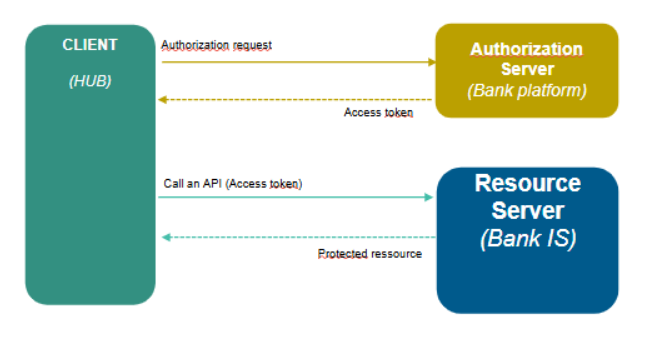
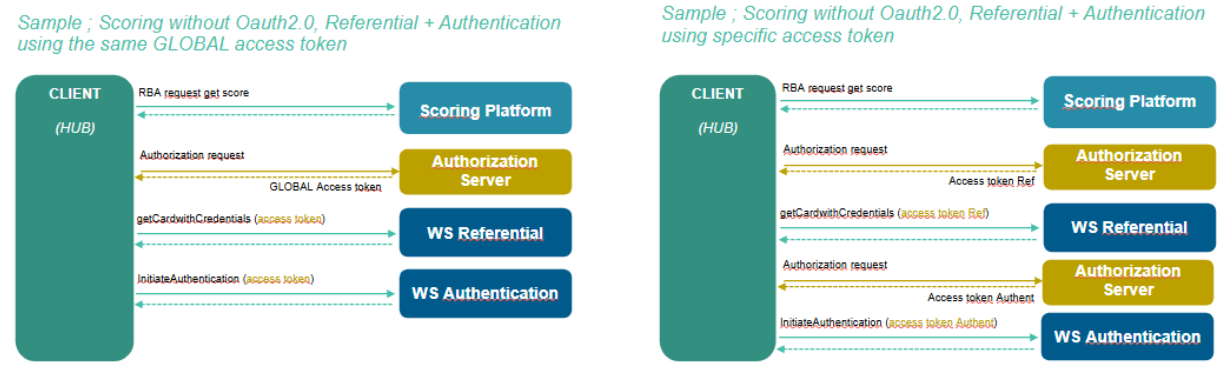
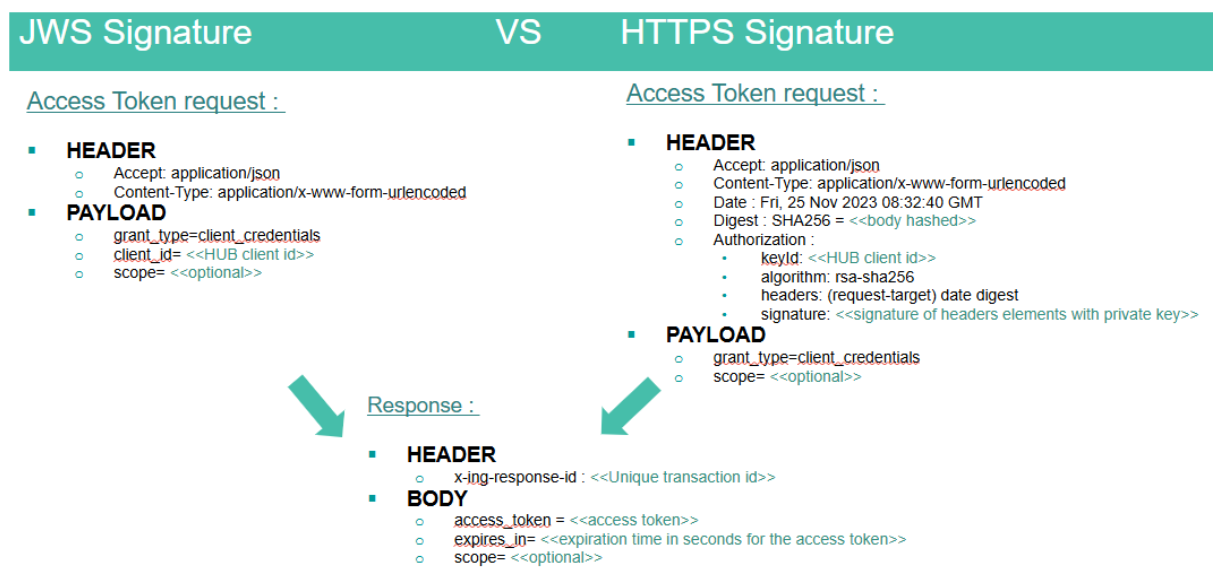
Transaction Export WS

Transaction Export WS

API Reference
Current version 25R2-1.0 of October 14th 2025
Transaction Export


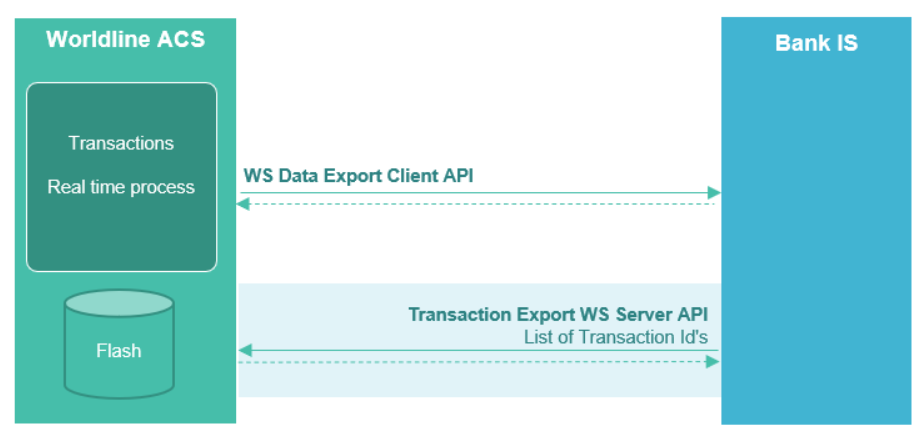
It is a public API to export transaction details for a given list of ACS transaction ID(s).​

​The API takes in Input : 1 to 10 ACS Transaction ID​ and returns a list of transaction(s) in JSON format.

The complete list of fields available on the API response is described in the swagger API.​

Notes that sensitive data should be encrypted.
There is no sensitive PCI-DSS data (as PAN is not provided)
 

Sensitive Data are regarding GDPR : 

  • billing and shipping address, 
  • email
  • phone number
  • cardholder name
  • IP address
Enable "on this page" menu on doc section
On

Authentication OpenID WS Client

Authentication OpenID WS Client

API Reference

This document describes the OpenID 1.0 interfaces exposed by an external authentication platform and expected by Authentication HUB as client server. This document is based on OpenID 1.0 specifications  

1. Overview

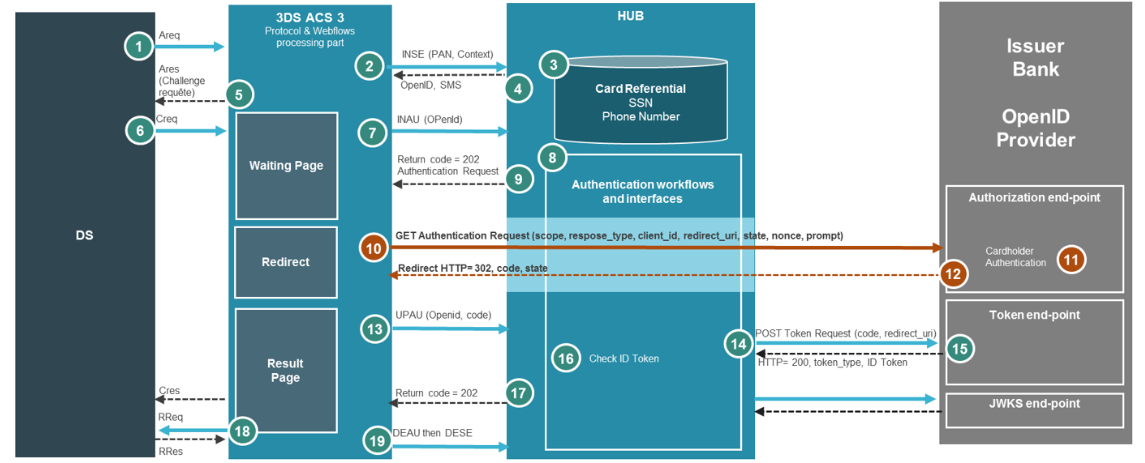
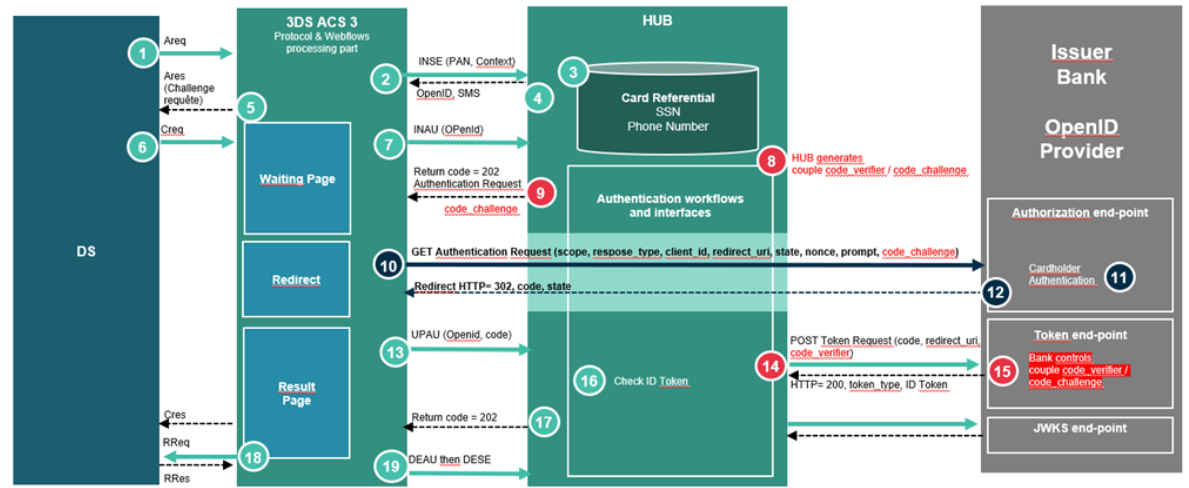
Authentication HUB uses the OpenID Authorization Code Flow to do user authentication during a 3DS request.

The Authorization Code Flow goes through the following steps.

  • Client (HUB) prepares an Authentication Request containing the desired request parameters. – STEP 8
  • Client (ACS3) sends the request to the Authorization Server. – STEP 10
  • Authorization Server (Issuer Bank) authenticates the End-User.– STEP 11
  • Authorization Server (Issuer Bank) sends the End-User back to the Client with an Authorization Code. – STEP 12
  • Client (HUB) requests a response using the Authorization Code at the Token Endpoint.– STEP 14
  • Client (HUB) receives a response that contains an ID Token and Access Token in the response body.– STEP 15
  • Client (HUB) validates the ID token and retrieves the End-User's Subject Identifier.– STEP 16

    OpenId flow diagram

2. Requirement

All following informations should be provided beforehand in order to setup OpenID authentication.

Provided to Authentication HUB by Authorization server:

  • Authorization server openid configuration url ( which contains jwks_uri, authorization_endpoint, token_endpoint, should not contain fragment components)
  • Client password : client_id and client_secret (RFC6749 section-2.3.1)
  • Whether or not authentication data validation is necessary on HUB side
    • Authentications data type used for end user authentication (data should be provided in HUB repository database using the credential type 'OPENID')

Provided to Authorization server by Authentication HUB:

  • RSA Public key for token encryption (JWE)

3. Connectivity

3.1. Network

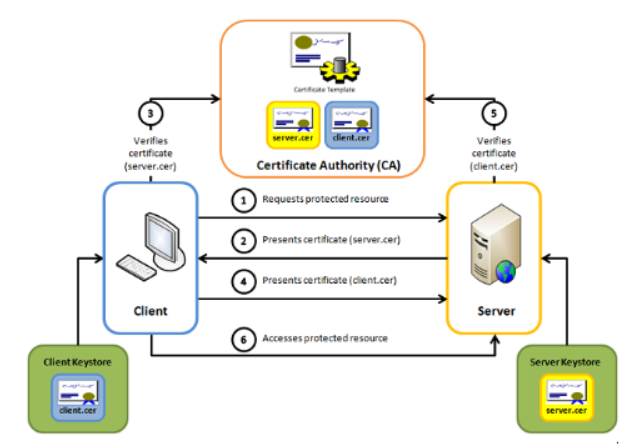
All the services are exposed through the HTTPS protocol (RFC 2818) TLS 1. 2.

No HTTP compression (RFC 2616) is activated.

3.2. Security

RSA keys used MUST be 2048 bits or longer. Elliptic curve keys must be long enough to provide a symmetric key equivalent security strength of at least 112 bits (typical EC algorithm key length of 224 bits or longer). Symmetric keys MUST be 128 bits or longer. Hash algorithms used MUST have a digest size of 224 bits or longer.

3.2.1. Signature

Tokens MUST be digitally signed JWTs and must be validated by the receiver using the pre-exchanged signature validation keys. JOSE header kid (RFC 7515) should be used for identifying the key used in all cryptographically secured JWTs. The algorithm used for signing is RSASSA-PKCS1-v1_5 using SHA-256 for JWS (RS256 value for alg header field) and RSAES OAEP using default parameters for JWE (RSA-OAEP value for alg header field). The public key for the kid value should be available for validation in a JWKS endpoint (RFC7517).

By default, the authentication HUB will call JWKS endpoint in these cases:

  • Hub applications start
  • New kid value provided by authorization server (signature certificates renewal for example)
  • Once per day to check JWKS endpoint availability

The public certificates will be stored in a memory cache in order to avoid calling JWKS endpoint for each transaction. If the server maintainer wants the Hub to make a call for each transaction, it can request it.

3.2.2. PKCE

OAuth 2.0 provides a version of the Authorization Code Flow which makes use of a Proof Key for Code Exchange (PKCE).

Usage of PKCE is optional and must be configured during project phase.

The PKCE introduces a secret created by the HUB that can be verified by the authorization server; this secret is called the Code Verifier. Additionally, the HUB creates a transform value of the Code Verifier called the Code Challenge and sends this value over HTTPS to retrieve an Authorization Code. This way, a malicious attacker can only intercept the Authorization Code, and they cannot exchange it for a token without the Code Verifier.

A Code Verifier is generated by HUB for each Oauth transaction, it is a high-entropy cryptographic random with a minimum length of 43 characters.

The Code Challenge is calculated by hashing the Code Verifier  in SHA256 then encoding the hash in B64.

Flow using PKCE

3.2.3. Encryption

Encryption of OIDC Tokens is mandatory for Token with authentication data. The ID Token from the Authorization Server must be first signed by one of the signing private keys and then encrypted using the Authentication HUB public encryption key. In other words, the Token is first secured with JWS and then with JWE to create a nested JWT as described in the OIDC Core specification (section 10). For this to be possible the Authentication HUB needs to have an asymmetric encryption key.

The encryption algorithm used is RSAES OAEP using default parameters (RS256 value for alg header field).

4. OpenID Connect methods

4.1. Authorization endpoint

The Authorization Endpoint performs Authentication of the End-User. This is done by sending the User Agent to the Authorization Server’s Authorization Endpoint for Authentication and Authorization, using request parameters defined by OAuth 2.0 and additional parameters and parameter values defined by OpenID Connect.

4.1.1. Request

Authentication endpoint should support POST and GET. ACS client will use GET method to send the request.

Parameters

FieldValueMandatoryFormatComment
scopeopenidX  
response_typecodeX  
client_id XVariable, maximum 255 characters / StringClient identifier retrieved during registration
redirect_uri XString of 1 to 2048 charactersACS redirect uri
state XMUST contain at least 128 bits of entropy (for example at least 22 random characters A-Z, a-z, 0-9). 
Nonce XMUST contain at least 128 bits of entropy (for example at least 22 random characters A-Z, a-z, 0-9). 
PromptloginX  
ui_locales  Format described in rfc5646

End user language preference

tags (BCP 47)

transaction_id X

Unique Transaction identifier

Length: 36 characters

UUID

HUB authentication id

session_id  

Unique Transaction identifier

Length: 36 characters

HUB / ACS session id
payee   

Areq.merchantName

Optional for NPA

amount  Amount without exponent

Areq.purchaseAmount

Optional for NPA

currency_code  Currency code on 3 digits as defined in ISO 4217

Areq.purchaseCurrency

Optional for NPA

currency_exponent  Minor units of currency as specified in the ISO 4217 currency exponent

Areq.purchaseExponent

Optional for NPA

trusted_enrollment_request  Contains trusted beneficiary consent informationBoolean
login_hint  Hint to the Authorization Server about the login identifier the End-User might use to log in (if necessary)String
code_challenge 

C

(mandatory for PKCE)

PKCE challenge codeB64 encoding of
SHA256 of code verifier
code_challenge_method 

C

(mandatory for PKCE)

Constant equals S256 when code verifier transformation method is SHA256S256

Sample

     GET /authorize?
        scope=openid
        &response_type=code
        &client_id=s6BhdRkqt3
        &redirect_uri=https%3A%2F%2Fclient.example.org%2Fcb
        &state=af0ifjsldkj
        &nonce= n-0S6_WzA2Mj
        &prompt=login
        &transaction_id=3a6f4695-e791-45c4-9a9f-95bf0e416346
        &payee=merchant
        &amount=10000
        &currency_code=978
        &currency_exponent=2
        &trusted_enrollment_request=true
        &login_hint=571a48b12
        &code_challenge=E9Melhoa2OwvFrEMTJguCHaoeK1t8URWbuGJSstw-cM
   &code_challenge_method=S256    Host: server.example.com

4.1.2. Response

Response should return a 302 Found HTTP code even if error fields are non-empty.

Response without error:

FieldValueMandatoryFormatComment
code X 

Code from authentication

Response (could be null or not provided see remark below)

state XMUST contain at least 128 bits of entropy (for example at least 22 random characters A-Z, a-z, 0-9).Repeated from request

If “code” field is null or not provided then the use case corresponds to a user cancellation on authorization server.

If authentication fails, the field error must be set to “access_denied” and an error_description can be provided to distinguish the reason of this functional authentication failure.

Response with error:

FieldValueMandatoryFormatComment
state XMUST contain at least 128 bits of entropy (for example at least 22 random characters A-Z, a-z, 0-9).Repeated from request
error  X See error code below
error_description   Trace id in case of analysis requested or reason of authentication failure.

Errors

ErrorDescription
invalid_request

The request is missing a required parameter, includes an

invalid parameter value, includes a parameter more than once, or is otherwise malformed.

unauthorized_clientThe client is not authorized to request an authorization code using this method.
access_deniedThe resource owner or authorization server denied the request.
unsupported_response_type

The authorization server does not support obtaining an

authorization code using this method.

invalid_scopeThe requested scope is invalid, unknown, or malformed.
server_errorInternal server error
temporarily_unavailable

The authorization server is currently unable to handle

the request

Error descriptions

error_description is a free value, but Hub will interpret differently the following values in case of error = access_denied:

error_descriptionDescription
Auth_blockedAuthentication is blocked.
Auth_failedAuthentication failed.
Auth_expiredAuthentication is expired.

Samples

Success:

 HTTP/1.1 302 Found
 Location: https://client.example.org/cb?
    code=SplxlOBeZQQYbYS6WxSbIA
    &state=af0ifjsldkj

Technical Error:

    HTTP/1.1 302 Found
    Location: https://client.example.org/cb?
    error=invalid_request
    &error_description=Unsupported%20response_type%20value
    &state=af0ifjsldkj

Authentication Failure:

    HTTP/1.1 302 Found
    Location: https://client.example.org/cb?
    error=access_denied
    &error_description=Auth_failed
    &state=af0ifjsldkj

4.2. Token endpoint

To obtain an Access Token, an ID Token, and optionally a Refresh Token, the HUB (Relying Party - Client) sends a Token Request to the Token Endpoint to obtain a Token Response, as described in Section 3.2 of OAuth 2.0 [RFC6749], when using the Authorization Code Flow.

4.2.1. Request

To exchange the authorization code for an access token, HUB client makes a POST request to the service’s token endpoint.

Headers

FieldValueComment
Content-Typeapplication/x-www-form-urlencoded 
AuthorizationBasic client_id:client_secretstring “client_id:client_secret” encoded in Base64

Parameters

FieldValueMandatoryFormatComment
grant_typeauthorization_codeX  
code XStringauthorization code received from the authorization server
redirect_uri XString of 1 to 2048 charactersACS redirect uri (same as authorization request)
code_verifier  PKCE code verifierhigh-entropy cryptographic random with a minimum length of 43 characters and a maximum length of 128 characters

Sample

    POST /token HTTP/1.1
    Host: server.example.com
    Content-Type: application/x-www-form-urlencoded
    Authorization: Basic czZCaGRSa3F0MzpnWDFmQmF0M2JW
    grant_type=authorization_code
    &code=SplxlOBeZQQYbYS6WxSbIA
    &redirect_uri=https%3A%2F%2Fclient.example.org%2Fcb
    &code_verifier=0MF7_qn397NQ_c1cnJkIB4tKPZrWXX0yAFCWFiYw_VA
     

4.2.2. Response

After receiving and validating a valid and authorized Token Request from the HUB, the Authorization Server returns a successful response that includes an ID Token and an Access Token.

Parameters

Response should return a 200 http code for success (for error http code see below).

Response without error:

FieldValueMandatoryFormatComment
access_token XStringNot used by the HUB
expires_in  IntegerNot used by the HUB
token_typeBearerX  
id_token XStringJWT token (see below for description)

Response with error:

FieldValueMandatoryFormatComment
error  StringSee error code below
error_description  StringTrace id in case of analysis requested
4.2.2.1. ID Token without authentication data

JWS
 

JWS Header
FieldValueMandatoryFormatComment

alg


RS256X RSASSA-PKCS1-v1_5 using SHA-256
kid XStringKid should be in server JWKS url endpoint
JWS Payload
iss XStringIssuer identifier url (without uri)
sub XStringSubject identifier (unique for the transaction)
aud XStringclient ID (same as provided by client in authorization request)
exp XNumericDate (RFC7519)current time + 5mn
iat XNumericDate (RFC7519)time at which the token was generated
auth_time XNumericDate (RFC7519)time when the authentication occurred
nonce XStringsame value as in previous messages
JWS Signature
4.2.2.2. ID Token with authentication data

The ID Token is a nested JWT (JWE containing a JWS, first signed and then encrypted JWT containing information about the end user that authenticated) In order to protect authentication data, the token should be encrypted with the public key of the Authorization server.

HUB will generate a privet/public key pair (format RSA AES 256). Only public key is shared with the Issuer Bank Authorization Server.

JWE

JWE Header
FieldValueMandatoryFormatComment

alg


RSA-OAEPX RSAES OAEP using default parameters
encA128GCMX  
kid XStringKid should be in server JWKS url endpoint
JWE Ciphertext
JWS token (see below)

JWE also contain Encrypted Key, Initialization Vector and Tag, descripted in JWE specification. (https://tools.ietf.org/html/draft-ietf-jose-json-web-encryption-40)

JWS

JWS Header
FieldValueMandatoryFormatComment

alg


RS256X RSASSA-PKCS1-v1_5 using SHA-256
kid XStringKid should be in server JWKS url endpoint
JWS Payload
iss XStringIssuer identifier url
sub XStringSubject identifier (unique for the transaction)
aud XStringclient ID
exp XNumericDate (RFC7519)current time + 5mn
iat XNumericDate (RFC7519)time at which the token was generated
auth_time XNumericDate (RFC7519)time when the authentication occurred
nonce XStringsame value as in previous messages
data_type_1 XStringAuthentication data type, possible value: SSN,DDN,PWD, …
data_value_1 XStringAuthentication data value
data_type_2  StringAuthentication data type, possible value: SSN,DDN,PWD, …
data_value_2  StringAuthentication data value
data_type_3  StringAuthentication data type, possible value: SSN,DDN,PWD, …
data_value_3  StringAuthentication data value
data_type_4  StringAuthentication data type, possible value: SSN,DDN,PWD, …
data_value_4  StringAuthentication data value
data_type_5  StringAuthentication data type, possible value: SSN,DDN,PWD, …
data_value_5  StringAuthentication data value
JWS Signature

Authentication data claims

Authentication data used for end user authentication on HUB side are stored in “data_type_X” and “data_value_X”. Only “data_type_1” and “data_value_1” are mandatory for authentication. If authentication servers require more security, up to five authentication data could be sent to the HUB for check. Authentication data type should be exchanged beforehand between authorization server and HUB client.


Sample

    data_type_1 : DDN 
    data_value_1 : 10/03/1980 
    data_type_2 : PWD 
    data_value_2 : totopwd

Errors

HTTP CodeErrorDescription
400invalid_requestThe request is missing a required parameter, includes an invalid parameter value, includes a parameter more than once, or is otherwise malformed.
400invalid_grantThe provided authorization grant (e.g., authorization code, resource owner credentials) is invalid, expired, revoked does not match the redirection URI used in the authorization request, or was issued to another client.
400unauthorized_clientThe authenticated client is not authorized to use this authorization grant type.
400unsupported_grant_typeThe authorization grant type is not supported by the authorization server.
401invalid_clientClient authentication failed

Other HTTP code should be treated as an unknown error.

Samples

Success:

    
    HTTP/1.1 200 OK
    Content-Type: application/json
    {
    "access_token": "SlAV32hkKG",
    "token_type": "Bearer",
    "refresh_token": "8xLOxBtZp8",
    "expires_in": 3600,
    "id_token": " eyJhbGciOiJSU0EtT0FFUCIsImVuYyI6IkEyNTZHQ00ifQ.
    OKOawDo13gRp2ojaHV7LFpZcgV7T6DVZKTyKOMTYUmKoTCVJRgckCL9kiMT03JGe
    ipsEdY3mx_etLbbWSrFr05kLzcSr4qKAq7YN7e9jwQRb23nfa6c9d-StnImGyFDb
    Sv04uVuxIp5Zms1gNxKKK2Da14B8S4rzVRltdYwam_lDp5XnZAYpQdb76FdIKLaV
    mqgfwX7XWRxv2322i-vDxRfqNzo_tETKzpVLzfiwQyeyPGLBIO56YJ7eObdv0je8
    1860ppamavo35UgoRdbYaBcoh9QcfylQr66oc6vFWXRcZ_ZT2LawVCWTIy3brGPi
    6UklfCpIMfIjf7iGdXKHzg.
    48V1_ALb6US04U3b.
    5eym8TW_c8SuK0ltJ3rpYIzOeDQz7TALvtu6UG9oMo4vpzs9tX_EFShS8iB7j6ji
    SdiwkIr3ajwQzaBtQD_A.
    XFBoMYUZodetZdvTiFvSkQ"
    }

Error:

    
    HTTP/1.1 400 Bad Request
    Content-Type: application/json
    {
    "error": "invalid_request"
    }
4.2.2.3. Token Response Validation

This token response needs to be checked by us to be sure that :

  • Authentication is successful,
  • Authentication is performed by the expected Cardholder.

In addition to the OpenID Connect standard validation (section 3.1.3.5), the cardholder identifier(s) must be checked with data known by HUB.

If the ID Token doesn’t contain authentication data, the Subject Identifier included in response message (field sub) must contain the expected cardholder identifier stored in the HUB repository.

The HUB platform can manage 3 different types of identifier :

  • SSN - Social Security number
  • OPENID – Dedicated cardholder identifier for OpenID authentication method
  • CARDHOLDERID – Cardholder identifier

 An Issuer Bank configuration is set during Project Phase to define what kind of identifier will be used. The corresponding information must be provided by Bank IS either by Referential Batch File or Web services.

The Subject Identifier is compared to data stored in card repository on HUB side. If it doesn’t match, the HUB will return “authentication failed” status to the ACS application.

If ID Token contains authentication data, in addition to verifying Subject Identifier, the authentication data are compared to data stored in card repository on HUB side. If they don’t match, the HUB will return “authentication failed” status to ACS application.

Currently supported authentication data types are:

  • SSN
  • DDN (birth date, formatted as “dd/MM/yyyy”)
  • PWD (password)
  • CARDHOLDERID

4.3. JWKS endpoint

4.3.1. Frequency of requests

The HUB will keep the signing keys in cache session with the corresponding kid value.

A call to the JWKS endpoint is done to retrieve the public key only in the following cases:

- On each restarting the application,

- On each renewing of the public key; when a new “kid” value is returned by OpenID Provider,

- Once a day to check the availability of the service.

4.3.2. Rotation of Asymmetric Signing Keys

Rotation of signing keys must be done every 2 years with the following approach.

The Bank OpenID Provider publishes its keys in a JWK Set at its jwks_uri location and includes the kid of the signing key in the JOSE Header of each message to indicate to the verifier which key is to be used to validate the signature.

Keys can be rolled over by adding new keys to the JWK Set at the JWKS endpoint.

The signer (OpenID provider) can begin using a new key at its discretion and signals the change to the verifier (HUB) using the kid value.

The HUB knows to go back to the jwks_uri location to re-retrieve the keys when it sees an unknown kid value.

The JWK Set document at the jwks_uri SHOULD retain recently decommissioned signing keys for a reasonable period of time to facilitate a smooth transition.

4.4. Provider Configuration endpoint

For details about the Provider Configuration endpoint implementation, see OpenID Connect Discovery documentation.

The claims used by the Authentication Hub are:

  • issuer
  • authorization_endpoint
  • token_endpoint
  • jwks_uri

All these claims are necessary. Any additional claim will be ignored.

Answer sample:

    
    HTTP/1.1 200 OK
    Content-Type: application/json
    {
    "issuer": "https://server.example.com",
    "authorization_endpoint": "https://server.example.com/connect/authorize",
    "token_endpoint": "https://server.example.com/connect/token",
    "jwks_uri": "https://server.example.com/jwks.json"
Enable "on this page" menu on doc section
On

Callback WS Server

Callback WS Server

API Reference
Current version 25R2-1.0 of September 4th 2025
Callback WS Server

Authentication WS Callback Server is the standard authentication interfaces exposed by the ACS platforms. This interface should be used to return the result of an external authentication. 

ACS is therefore server of the API.


1. Functional Workflows

  1.1 Out Of Band flow

Callback API is used for Out of Band authentication like mobile application, when authentication is done outside ACS platform with an asynchronous method. 

Flow for standard callback

After 3DS first steps and challenge decision, ACS initializes the external authentication and displays only a wait page. Cf. message (12)

Once the authentication is done, external Authentication platform must return to ACS the final status and the authentication method used.cf. message (15) corresponding to callback API.

The callback request must contain also the initial identifier of transaction (sessionId), provided during the initiateAuthentication method in order to allow HUB to retrieve and check the initial transaction.

Callback API includes a new intermediate status "PENDING" in order to follow transaction process.

This status could be used to forward information to ACS platform regarding the ongoing authentication request.

  1.2 Decoupled flow

The callback API is also mandatory for decoupled authentication.

Flow for decoupled callback

A similar workflow is used for Decoupled Authentication, the gap is :

  • ACS only returns a Ares message in real time,
  • No CReq / Cres message,
  • Cardholder is notified and has until 7 days max. to authenticate,
  • A dedicated Callback Method must be used,
  • ACS returns RRes only after final authentication status or if decoupled is expiry.
Enable "on this page" menu on doc section
On

Authentication WS Client

Authentication WS Client

API Reference
Current version 25R2-1.0 of September 4th 2025
Authentication WS Client

Authentication WS Client  is the standard authentication interfaces exposed by the authentication platforms. These interfaces that are available by default in the authentication HUB to process authentication. The bank can implement those interfaces on server side.

ACS is therefore client of the authentication platforms.


1. Functional Workflows

  1.1 Simple nominal flow

Simple

The first one is a simple flow with an initiateAuthentication and a validateAuthentication request, where all data is forwarded by the Hub to let the bank validate the authentication.

  1.2 Nominal flow with authentication and callback

Nominal

The second one is a similar example where the validation is done out of band, directly between the bank and the user (there is no validateAuthentication  request). To notify the result once the authentication is finished, the bank then calls back the hub.

  1.3 Cancel flow

Cancel

The third case is an example of a cancelled authentication. If the user cancels its authentication on the ACS page, the hub forwards the cancellation information to the bank through the cancelAuthentication request.

Enable "on this page" menu on doc section
On

Referential WS Client

Referential WS Client

API Reference
Current version 25R2-1.0 of September 4th 2025
Referential WS Client

Referential WS Client is the standard referential interfaces exposed by the Issuers' Bank. 
ACS is therefore client of the Bank Information System.

Thanks to this API ACS can  :

  • get card information from the Bank Information System ;
  • update cards/users/credentials information to the Bank Information System.

1. End points

  1.1. echo

POST /echo

Echo function to test the availability of the WS.

Example
Input : 
 

{
	"header": {
		"issuerCode": "12345",
		"subIssuerCode": "12345",
		"service": "ACS_U1X",
		"requestId": "5945b448-1fcf-41ad-9a1c-39bb16af4606",
		"keyTag": "02"
	},
	"body": {
		"principal": {
			"type": "encryptedPan",
			"value": "11A18541F9C9E748F62186292BC2DB48BF407F2B049390FBE1037D00AF5FACDA"
		},
		"expiry": {
			"type": "encrypted",
			"value": "8BF407F2B049390FBE1037D00AF5FACDA"
		}
	},
	"footer": {}
}
 

Output :
 

{
	"header": {
		"issuerCode": "12345",
		"subIssuerCode": "12345",
		"service": "ACS_U1X",
		"requestId": "5945b448-1fcf-41ad-9a1c-39bb16af4606",
		"keyTag": "02"
	},
	"body": {
		"timestamp ": "2016-11-16 06:43:19.77"
	},
	"footer": {}
}


  1.2. getCardWithCredentials

POST /getCardWithCredentials

This function will be used to get a card with its credentials.

Example
Input :
 

{
	"header": {
		"issuerCode": "12345",
		"subIssuerCode": "12345",
		"service": "ACS_U1X",
		"requestId": "5945b448-1fcf-41ad-9a1c-39bb16af4606",
		"keyTag": "02"
	},
	"body": {
		"principal": {
			"type": "encryptedPan",
			"value": "11A18541F9C9E748F62186292BC2DB48BF407F2B049390FBE1037D00AF5FACDA"
		},
		"expiry": {
			"type": "encrypted",
			"value": "8BF407F2B049390FBE1037D00AF5FACDA"
		}
	},
	"footer": {}
}


Output - success :
 

{
	"header": {
		"issuerCode": "12345",
		"subIssuerCode": "12345",
		"service": "ACS_U1X",
		"requestId": "5945b448-1fcf-41ad-9a1c-39bb16af4606",
		"keyTag": "02"
	},
	"body": {
		"credentials": {
			"type": "plain",
			"value": "{\"METHOD:PWD\":[{\"value\":\"f2d81a260dea8a100dd517984e53c56a7523d96942a834b9cdc249bd4e8c7aa9\",\"algorithm\":\"SHA-256\"}]
}"
		},
		"cardholderId": "00000003 ",
		"cardId": "00000004",
		"language": "en"
	},
	"footer": {}
}


Output - error :
 

{
	"header": {
		"issuerCode": "12345",
		"subIssuerCode": "12345",
		"service": "ACS_U1X",
		"requestId": "5945b448-1fcf-41ad-9a1c-39bb16af4606",
		"keyTag": "02"
	},
	"body": {
		"errorCode":"40401"
	},
	"footer": {}
}


  1.3. updateCardCredentials

POST /updateCardCredentials

This function will be used to update a card with its credentials. In case of success, the server should only return success code HTTP 200. In case of error, no retry will be triggered on client side.

Example
Input - update data :
 

{
	"header": {
		"issuerCode": "12345",
		"subIssuerCode": "12345",
		"service": "ACS_U1X",
		"requestId": "5945b448-1fcf-41ad-9a1c-39bb16af4606",
		"keyTag": "02"
	},
	"body": {
		"principal": {
			"type": "encryptedPan",
			"value": "11A18541F9C9E748F62186292BC2DB48BF407F2B049390FBE1037D00AF5FACDA"
		},
		"expiry": {
			"type": "encrypted",
			"value": "8BF407F2B049390FBE1037D00AF5FACDA"
		},
"credentials": {
	"type": "plain",
	"value": "{\"METHOD:PWD\":[{\"value\":\"f2d81a260dea8a100dd517984e53c56a7523d96942a834b9cdc249bd4e8c7aa9\",\"algorithm\":\"SHA-256\"}]}"
}
	},
	"footer": {}
}


Input - reset/delete data :
 

{
	"header": {
		"issuerCode": "12345",
		"subIssuerCode": "12345",
		"service": "ACS_U1X",
		"requestId": "5945b448-1fcf-41ad-9a1c-39bb16af4606",
		"keyTag": "02"
	},
	"body": {
		"principal": {
			"type": "encryptedPan",
			"value": "11A18541F9C9E748F62186292BC2DB48BF407F2B049390FBE1037D00AF5FACDA"
		},
		"expiry": {
			"type": "encrypted",
			"value": "8BF407F2B049390FBE1037D00AF5FACDA"
		},
"credentials": {
	"type": "plain",
	"value": "{\"METHOD:PWD\":\"\"}"
}
	},
	"footer": {}
}


Output - success :
HTTP 200

Output - error :
 

{
	"header": {
		"issuerCode": "12345",
		"subIssuerCode": "12345",
		"service": "ACS_U1X",
		"requestId": "5945b448-1fcf-41ad-9a1c-39bb16af4606",
		"keyTag": "02"
	},
	"body": {
		"errorCode": "40014"
	},
	"footer": {}
}


2. Credentials

The credential field have the following format

METHOD:@METHOD

value:@value, algorithm :@algorithm 

algorithm is optional and provided only if the data is hashed.

In updateCardCredentials, if no value is provided then the action on server side should be delete or reset.

Kinds of credential currently available are:

  • SMS (mobile phone)
  • IVR (landline phone)
  • EMAIL
  • SSN
  • TA (Trusted Authentication on Mobile)
  • PWD
  • TOKEN
  • OTRC
  • USERCODE
  • OPENID – Dedicated cardholder identifier for OpenID authentication method

Notes that HUB phone number must be in international standard E.164 format.
E.164 numbers are formatted [+] [country code] [subscriber number including area code] and can have a maximum of fifteen digits.


Examples:

"METHOD:SMS": [{

"value": "+1234567890"

}]

"METHOD:IVR": [{

"value": "+1234567890"

}]

"METHOD:EMAIL": [{

"value": "user@email.com"

}]

"METHOD:SSN": [{

"value": "123456789012345"

}]

"METHOD:PWD": [{

"value": "f2d81a260dea8a100dd517984e53c56a7523d96942a834b9cdc249bd4e8c7aa9",

"algorithm": "SHA-256"

}]

"METHOD:PWD": [{

"value": "MyS3cr37P@55w0rd"

}]

"METHOD:OTRC": [{

"value": "MyS3cr3707RC"

}]

"METHOD:OTRC": ""

"METHOD:TA": [{

"value": "MyTAUserId"

}]

"METHOD:USERCODE":[{

"value":"123123123"

Enable "on this page" menu on doc section
On

Referential WS Server

Referential WS Server

API Reference
Current version 25R2-1.0 of September 4th 2025

Referential WS Server
Referential WS Server is the standard referential interfaces exposed by ACS.
The bank is therefore client of ACS.

Thanks to this API the bank can  :

  • get card information from ACS ;
  • update cards/users/credentials information to ACS.

1. End points

    1.1.  updateCardWithCredentials

POST ~/referential/rest/{version}/public/updateCardWithCredentials/{requestId}

This function will be used to create or update a card with its credentials.

Examples

  • Request to manage cards

Input : 

{
"cards":[
       { "id":"1",
         "principal": { "type": "pan", "value": "4000000000000002"},
         "expiry": {	"type": "plain", "value": "2023-06"}
       },
       { "id":"2",
         "principal":{ "type": "pan", "value": "8139986370259068"},
         "expiry": { "type": "plain", "value": "2020-12" }
       }
       ],
"service": "ACS_U9F",
"issuerCode": "66666",
"subIssuerCode": "66666",
"status": "ACTIVE",
"deletedTime":"2022-12-23T09:45:35",
“firstName”:“John”,
“lastName”:”Dow”,
"language": "fr",
"credentialsUpdateMode": "DELETE_AND_CREATE",
"credentials": {
                "type": "plain",
                "value":{\"METHOD:SMS\":[{\"sms\":\"+491741234567\"}],\"METHOD:DDN\":[{\"ddn\":\"19810803\",\"ddnPattern\":\"AAAAMMJJ\"}]}"
               }
}

Output :

{
    "cardResponses": [
        {
            "id": "1",
            "cardHolderId": "1e8a227f-f34a-4b1f-84d0-32fe5a1eb8d5",
            "tokenPan": "mckei58l0k504lpp",
            "language": "en"
        },
        {
            "id": "2",
            "cardHolderId": "ef9a45e1-2399-4af4-89e4-37011ab3a50b",
            "tokenPan": "mck3a8l5947lecip",
            "language": "en"
        }
    ]
}
  • Request to manage cards

Input : 

{
"cards":[
       { "id":"1",
         "principal": { "type": "pan", "value": "4000000000000002"},
         "expiry": {	"type": "plain", "value": "2023-06"}
       },
       { "id":"2",
         "principal":{ "type": "pan", "value": "8139986370259068"},
         "expiry": { "type": "plain", "value": "2020-12" }
       }
       ],
"service": "HUB_NRT",
"issuerCode": "66666",
"subIssuerCode": "66666",
"status": "ACTIVE",
"deletedTime":"2022-12-23T09:45:35",
“firstName”:“John”,
“lastName”:”Dow”,
"language": "fr",
"credentialsUpdateMode": "DELETE_AND_CREATE",
"credentials": {
                "type": "plain",
                "value": "{\"METHOD:EMAIL\":[{\"email\":\"{{email_address}}\"}]}"
               }
}

Output :

{
    "cardResponses": [
        {
            "id": "1",
            “cardId”:  "30a93d15-c8f0-4bee-848e-b029c3e6c8e1",
            "cardHolderId": "81453cf5-afce-4d38-8fec-4bcfc21a7cf3",
            "tokenPan": "mckODEzOTk4NjM3MDI1OTA2OA==",
            "language": "fr"
        },
        {
            "id": "2",
            “cardId”: "bdfe9373-5908-4856-86b1-edc1a4697cb0"
            "cardHolderId": "01821c69-ebac-44e2-b963-0abe6f6b1b5a",
            "tokenPan": "mckODEzOTk4NjM3MDI1OTA2OA==",
            "language": "fr"
        }
    ]
}
  • Request to manage cards after adding new format of credentialList    

Input : 

{
    "service": "{{service}}",
    "issuerCode": "{{issuerCode}}",
    "subIssuerCode": "{{subIssuerCode}}",
    "cards": [
        {
            "id": "1",
            "principal": {
                "type": "pan",
                "value": "{{pan}}"
            },
            "expiry": {
                "type": "plain",
                "value": "2023-10"
            }
        }
    ],
    "credentialList": [
        {
            "type": "IVR",
            "value": "+37477445464"
        },
        {
            "type": "EMAIL",
            "value": "tigranyan.argishti@gmail.com"
        }
    ],
    "effectiveUpdateDate": "2024-01-16T13:23:55",
    "credentialsUpdateMode": "DELETE_AND_CREATE"
}

Output :

{
    "cardResponses": [
        {
            "id": "1",
            "cardId": "48c4f206-149a-4d3e-a04d-b0e3c729c92b",
            "cardHolderId": "38c83f83-9460-4a13-a7c8-41913d6a0462",
            "tokenPan": "mckNDk3NjcwMDAwMDAwMDAxNQ=="
        }
    ]
}
  • Request to delete card credentials    

Input : 

{
    "service": "HUB_NRT",
    "issuerCode": "66666",
    "subIssuerCode": "66666",
    "cards": [
        {
            "id": "GUID",
            "principal": {
                "type": "pan",
                "value": "4532953162392327"
            },
            "expiry": {
                "type": "plain",
                "value": "2024-03"
            },
            "cardHolderId": "ef9a45e1-2399-4af4-89e4-37011ab3a50b"
        }
    ],
    "credentials": {
        "type": "plain",
        "value": "{\"METHOD:SMS\":[{\"sms\":\"DELETE\"}]}"
    },
    "credentialsUpdateMode": "DELETE"
}

    1.2. searchCard

POST ~/referential/rest/{version}/public/searchCard/{requestId}

Search card by pan, token pan and expiry date.

Examples

  • Sample 1 of successful search card    

Input : 

Content-Type: application/json
{
         "principal" : {
         "type": "pan",
         "value": "3569990010059540"
            },
    "service": "ACS_U5G",
    "issuerCode": "00006",
    "subIssuerCode":"00006",
    "expiry": {
         "type": "expiry",
         "value": "2017-11"
            }
}

Output :

{
    "id": "8f7b2bd8-9e9a-46a3-8006-a768e10dee9f",
    "createdTime": "2020-11-25T06:37:55",
    "updatedTime": "2019-03-05T04:18:26",
    "deletedTime": "2022-10-23T08:55:15",
    "token": "g00ccbf4c96f5b98",
    "cardHolderId": "046949fc-a1b8-49ca-b19b-245619262a1e",
“firstName”:“John”,
“lastName”:”Dow”,
    "language": "fr",
    "status": "ACTIVE",
    "credentials": {
        "type": "plain",
        "value": "{\"METHOD:DDN\":[{\"ddn\":\"01011970\",\"ddnPattern\":\"DDMMYYYY\"}],\"METHOD:PWD\":[{\"pwd\":\"!@#$,{;(^&*)}:\\\\.?/+-_=|'][~\\\"%!@#$,{;(^&*)}:\\\\.?/+-_=|'][~\\\"%\"}],\"METHOD:SMS\":[{\"sms\":\"+33600000000\"}],\"METHOD:EMAIL\":[{\"email\":\"testworldlinebox1@yopmail.com\"}]}"
    }
}
  • Sample 2 of successful search card    

Input : 

Content-Type: application/json
{
         "principal" : {
         "type": "pan",
         "value": "4000000000000002"
            },
    "service": “HUB_NRT",
    "issuerCode": "66666",
    "subIssuerCode":"66666",
    "expiry": {
         "type": "plain",
         "value": "2023-06"
            }
}

Output :

{
    "id": "52b3f168-aef2-40e2-80ff-7974e325b55c", 
    "createdTime": "2022-12-01T11:43:59", 
    "deletedTime": "2022-12-23T09:45:35", 
    "token": "mckNDAwMDAwMDAwMDAwMDAwMg==", 
    "cardId": "52b3f168-aef2-40e2-80ff-7974e325b55c", 
   “cardHolderId”: “e57bcbf7-846e-4d5b-bb27-f9a2ec0d6a39”, 
   "firstName": "John", 
   "lastName": "Dow", 
   “language”: “fr”, 
   "status": "ACTIVE", 
   “expiryDate”: "2024-06", 
   "credentials": { "type": "plain", "value": "{\"METHOD:EMAIL\":[{\"email\":\"testnrt@gmail.com\"}]}" }, 
   "label": "cardLabel" 
}
  • Sample 3 of successful search card    

Input : 

Content-Type: application/json
{
    "principal": {
        "type": "pan",
        "value": "{{pan}}"
    },
    "cardHolderId": "{{cardHolderId}}",
    "expiry": {
        "type": "expiry",
        "value": "2023-10"
    },
    "service": "{{service}}",
    "issuerCode": "{{issuerCode}}",
    "subIssuerCode": "{{subIssuerCode}}"
}

Output :

{
    "id": "bae13888-7deb-4c68-9761-96c265062320",
    "createdTime": "2023-03-10T13:28:48",
    "updatedTime": "2023-03-10T13:28:59",
    "token": "mckNDk3NjcwMDAwMDAwMDAxNQ==",
    "cardId": "bae13888-7deb-4c68-9761-96c265062320",
    "cardHolderId": "811aa876-4a88-4fd4-815e-0f63fce8bb7c",
    "language": "fr",
    "status": "ACTIVE",
    "expiryDate": "2023-10",
    "credentialList": [
        {
            "type": "IVR",
            "value": "+37477445464"
        },
        {
            "type": "EMAIL",
            "value": "tigranyan.argishti@gmail.com"
        }
    ]
}
  • Sample of error card not found    

Output : 

{
    "issuerCode": "00006",
    "subIssuerCode": "00006",
    "requestId": "b8b1d1ae-3b65-48a2-b331-9607ab295412",
    "service": "ACS_U5G",
    "errorCode": "404030000",
    "origin": "REFERENTIAL",
    "message": "com.wl.gbl.ah.utils.services.exception.AuthenticationHUBExceptionV2: Card not found",
    "originVersion": "21R1.5-P-37",
    "originHost": "tqahx002v",
    "contextTemporary": {}
}

    16.3. copyCard

POST ~/referential/rest/{version}/public/copyCard/{requestId}

This function will be used for copying credential data from one card to another.

Examples

Input : 

{
    "service":"{{service}}",
    "issuerCode": "{{issuerCode}}",
    "subIssuerCode": "{{subIssuerCode}}",
    "oldPan": {
        "type": "pan",
        "value": "{{pan}}"
    },
    "oldDeletedTime": "2028-08-01T00:00:00",
    "oldCardStatus":"ACTIVE",
    "newPan": {
        "type": "pan",
        "value": "{{pan_4164}}"
    },
    "newExpiryDate": {
        "type": "expiry",
        "value": "2022-10"
    },
    "newDeletedTime": "2025-08-01T00:00:00",
    "newCardStatus":"ACTIVE",
    "newCardId":""
}
  • Output of successful copy card    
{
    "id": "0be3e040-acfa-4807-88b5-2214cd4b1d1b",
    "createdTime": "2023-03-10T13:34:30",
    "deletedTime": "2025-08-01T00:00:00",
    "token": "mckNDk3NjcwMDAwMDAwMDAyMw==",
    "cardId": "0be3e040-acfa-4807-88b5-2214cd4b1d1b",
    "cardHolderId": "811aa876-4a88-4fd4-815e-0f63fce8bb7c",
    "language": "fr",
    "status": "ACTIVE",
    "expiryDate": "2022-10",
    "credentialList": [
        {
            "type": "EMAIL",
            "value": "tigranyan.argishti@gmail.com"
        },
        {
            "type": "IVR",
            "value": "+37477445464"
        }
    ]
}
  • Output of error copy card when old PAN is unknown    
{
    "issuerCode": "66666",
    "subIssuerCode": "66666",
    "requestId": "4f70f7c9-8a74-411b-aff6-b9744c916fc5",
    "service": "ACS_U9F",
    "principals": [],
    "errorCode": "400100005",
    "origin": "REFCLIENT",
    "message": "com.wl.gbl.ah.utils.services.exception.AuthenticationHUBExceptionV2: Bad parameter : Undefined Card ",
    "originVersion": "21R2-P-05-SNAPSHOT",
    "originHost": "tsahx001v",
    "contextTemporary": {}
}

    1.4. updateUserWithCredentials

POST ~/referential/rest/{version}/public/updateUserWithCredentials/{requestId}

Current method will be used to update credentials of all cards for specified user. In case of request for more than one card, any error on one card will dismiss the update / creation for other cards.

Examples

  • Request to update user credentials

Input : 

{
    "service": "ACS_U9F",
    "issuerCode": "66666",
    "subIssuerCode": "66666",
    "credentials": {
        "type": "plain",
        "value": "{\"METHOD:SMS\":[{\"sms\":\"+37441901157\"}]}"
    },
    "credentialsUpdateMode": "UPDATE",
    "cardHolderId": "cardholderid",
    "firstName": "new first name",
    "lastName": "new last name"
}

Output :

{
    "cardResponses": [
        {
            "id": "53d47f12-463e-45d8-95c5-87dd4fc5ce16",
            "cardId": "5fddf717-e51f-4507-a439-6dc54d889970",
            "cardHolderId": "cardholderid",
            "tokenPan": "g02d20a3b496d266"
        },
        {
            "id": "c0931ee5-b195-4660-92b5-6ea54a7e554d",
            "cardId": "a9137220-ff21-48de-8120-507bb2283008",
            "cardHolderId": "cardholderid",
            "tokenPan": "g02d20a3b496d266"
        },
        {
            "id": "7e934f88-15f1-4166-86a1-1e38775dce01",
            "cardId": "updatedCardIdv2021R3",
            "cardHolderId": "cardholderid",
            "tokenPan": "g02d20a3b496d266"
        },
        ...
    ]	
}
  • Request to update user credentials after adding credentialList functionality

Input : 

{
    "service": "{{service}}",
    "issuerCode": "{{issuerCode}}",
    "subIssuerCode": "{{subIssuerCode}}",
    "cardHolderId": "{{cardHolderId}}",
    "principal": {
        "type": "pan",
        "value": "{{pan}}"
    },
    "expiry": {
        "type": "expiry",
        "value": "2022-10"
    },
    "firstName": "firstName",
    "lastName": "lastName",
    "language": "fr",
    "credentialsUpdateMode": "DELETE_AND_CREATE",
    "credentialList": [
        {
            "type": "SMS",
            "value": "+37477445464"
        },
        {
            "type": "EMAIL",
            "value": "tigranyan.argishti@gmail.com"
        },
        {
            "type": "IVR",
            "value": "+37494952595"
        }
    ],
    "label": "label"
}

Output :

{
    "cardResponses": [
        {
            "id": "f492fce5-2827-4902-9df9-b3bcd2fca227",
            "cardId": "f492fce5-2827-4902-9df9-b3bcd2fca227",
            "cardHolderId": "71b2bb27-3aa8-47ee-b594-d52f21f38ea7",
            "tokenPan": "mckNDk3NjcwMDAwMDAwMDAxNQ==",
            "language": "fr"
        }
    ]
}
  • Request to delete user credentials

Input : 

{
    "service": "HUB_NRT",
    "issuerCode": "66666",
    "subIssuerCode": "66666",
    "context": {
        "protocolVersion": "2.2"
    },
    "cards": [
        {
            "id": "GUID",
            "principal": {
                "type": "pan",
                "value": "4532953162392327"
            },
            "expiry": {
                "type": "plain",
                "value": "2024-03"
            },
            "cardHolderId": "ef9a45e1-2399-4af4-89e4-37011ab3a50b"
        }
    ],
    "credentials": {
        "type": "plain",
        "value": "{\"METHOD:TA\":[{\"TA\":\"DELETE\"}],\"METHOD:EMAIL\":[{\"email\":\"DELETE\"}]}"
    },
    "cardHolderId": "ef9a45e1-2399-4af4-89e4-37011ab3a50b",
    "firstName": "first name",
    "lastName": "last name",
    "credentialsUpdateMode": "DELETE"
}

    1.5. searchUserCredentials

POST ~/referential/rest/{version}/public/searchUserCredentials/{requestId}

Search user credentials by card holder ID.

Examples

  • Sample of successful search user credentials

Input : 

Content-Type: application/json
{
     "principal": {
        "type": "pan",
        "value": "4978041601875887"
    },
    "service": "ASC_U9F",
    "issuerCode": "66666",
    "subIssuerCode": "66666",
    "cardHolderId" : "302fe46b-c234-4386-b034-8227e073cfd9"
}

Output :

{
    "cardHolderId": "302fe46b-c234-4386-b034-8227e073cfd9",
    "language": "fr",
    "cardResponses": [
        {
            "status": "ACTIVE",
            "tokenPan": "mck1oba4c659oadp",
            "expiryDate": "2022-10",
            "credentials": {
                "type": "credentials",
                "value": "{\"METHOD:TA\":[{\"TA\":\"38a4a004-2e3b-11eb-adc1-0242ac120002\"}]}"
            }
        }
    ]
}
  • Sample of successful search user credentials after adding CredentialList functionality

Input : 

Content-Type: application/json
{
    "principal": {
        "type": "pan",
        "value": "{{pan}}"
    },
    "cardHolderId": "{{cardHolderId}}",
    "expiry": {
        "type": "expiry",
        "value": "2023-10"
    },
    "service": "{{service}}",
    "issuerCode": "{{issuerCode}}",
    "subIssuerCode": "{{subIssuerCode}}"
}

Output :

{
    "cardHolderId": "71b2bb27-3aa8-47ee-b594-d52f21f38ea7",
    "firstName": "firstName",
    "lastName": "lastName",
    "language": "fr",
    "cardResponses": [
        {
            "status": "ACTIVE",
            "tokenPan": "mckNDk3NjcwMDAwMDAwMDAxNQ==",
            "expiryDate": "2025-03",
            "credentialList": [
                {
                    "type": "SMS",
                    "value": "H##e9fe0c080fb29a7452a34d1fe213f46aeb1a7200cdd1e5fe467c595b"
                },
                {
                    "type": "IVR",
                    "value": "H##9b7b59e57230472c2bb7ab8f5947be9568ccd6447673ff474f6373ee"
                },
                {
                    "type": "EMAIL",
                    "value": "H##1c2a13bed56df2c7f7c1bb97f848643503088e671ac31df63e8238d97376084d2fead3c6f478d16cc220b746"
                }
            ]
        }
    ]
}
  • Sample of user credentials not found after adding CredentialList functionality

Output : 

{
    "cardHolderId": "74e9bf86-ca83-44cd-aa4e-58dd939e2936",
    "cardResponses": [
        {
            "status": "ACTIVE",
            "tokenPan": "mck26e5fc4c5hfkp",
            "expiryDate": "2022-11"
        }
    ]
}

    1.6. createVirtualCard

POST ~/referential/rest/{version}/public/createVirtualCard/{requestId}

Create Virtual Card, based on a real PAN.

Assumptions :

  • vPan must be a valid PAN number (13-19c.) with correct luhn key,
  • Expiry date could be handle for vPAN - A deleteTime is mandatory for each virtual card,
  • A PAN could have multiple vPAN,
  • vPAN must be linked to one and only one existing and active PAN.

As it was already mentioned, each virtual card is associated with a real card. But each real card should not have more than 100 active virtual cards connected to it. Aside of that, depending on the bank, the capability to retrieve the real PAN differs.

There are banks which are configured to have external card repository, which means that the real PAN remains unknown in the HUB database until the first transaction is done, For such Banks, a virtual PAN could be created for an unknown PAN in HUB’s database. Both cards, physical card (PAN) and virtual card (vPAN) will be created in one step base on the same request.

Example

Input : 

Content-Type: application/json
{
    "service": "ASC_U9F",
    "issuerCode": "66666",
    "subIssuerCode": "66666",
    "principal": {
        "type": "pan",
        "value": "4978041601875887"
    },
    “vPrincipal”: {
        "type": "pan",
        "value": "4716636697857207"
    }
    "vExpiryDate": {
        "type": "plain",
        "value": "2022-10"
    },
   "vDeletedTime": "2023-12-03T10:15:30"
}

Output : No Content

    1.7. updateVirtualCard

POST ~/referential/rest/{version}/public/updateVirtualCard/{requestId}

Update an existing Virtual Card.

Example

Input : 

Content-Type: application/json
{
    "service": "ASC_U9F",
    "issuerCode": "66666",
    "subIssuerCode": "66666",
    “vPrincipal”: {
        "type": "pan",
        "value": "4716636697857207"
    },
    "vExpiryDate": {
        "type": "plain",
        "value": "2022-10"
    },
   "vDeletedTime": "2023-12-03T10:15:30"
}

Output : No Content

2. Data Dictionary

    2.1. Credentials

Credentials field is corresponding to information of cardholder which is mandatory to initialize and launch the authentication.

The credentials value field is a String that can be parsed in JSON into a Map of credentials each containing a Map with its value. The value is always a String that needs to be casted to as JSON object, as a result, all the double quotes characters need to be escaped by a backslash. This process is only requested for data provided in plain text. For encrypted data, the encrypted result is in HEX format so compliant with JSON format.

  • Example 1: Plain example
"credentials": {
	"type": "plain",
	"value": "{\"METHOD:PWD\": [{\"pwd\": \"M0nP@sswrOrD\"}], \"METHOD:SMS\": [{\"sms\": \"+33600000000\"}]}"
}

This will be parsed into:

{
	"METHOD:PWD": [{
		"pwd": "M0nP@sswrOrD"
	}],
	"METHOD:SMS": [{
		"sms": "+33600000000"
	}]
}
  • Example 2: Encrypted example
"credentials": {
	"type": "encrypted",
	"value": "4a67ba0915b17c54f41d6bb79e35c0053f418728ccefa6e2c9e6f4b96a63e6c34452b8ced31f45b7bb6c9fb02e7972fd1731bb3e3350b30a4407b4b858f173
2a450434c2f01fc4", "keyTag": "01" }

The value in the 2nd example is the encrypted version of the value in the 1st example. When the type is encrypted, the encryption is applied to the entire value field.

Example 1: PlainExample 2: Encrypted
"value": "{\"METHOD:PWD\": [{\"pwd\": \"M0nP@sswrOrD\"}], \"METHOD:SMS\": [{\"sms\": \"+33600000000\"}]}""value": "4a67ba0915b17c54f41d6bb79e35c0053f418728ccefa6e2c9e6f4b96a63e6c
34452b8ced31f45b7bb6c9fb02e7972fd1731bb3e3350b30a4407b4b858f173
2a450434c2f01fc4"
  • Example 3: Hashed example

In some cases, the password can be pushed hashed. In that case here is how it needs to be used :

"METHOD:PWD\":
[{"value":"f2d81a260dea8a100dd517984e53c56a7523d96942a834b9cdc249bd4e8c7aa9","algorithm":"SHA-256"}]

Kinds of credential currently available are in standard are:

  • SMS 
    mobile phone used for authentication by OTP sent by SMS
    HUB phone number must be in international standard E.164 format.
    164 numbers are formatted [+] [country code] [subscriber number including area code] and can have a maximum of fifteen digits.
"credentials": {
    "type": "plain",
    "value": "{\"METHOD:SMS\":[{\"sms\":\"+33644190115\"}]}"
  },

On old version of Card Repository:

"credentials": {
    "type": "plain",
    "value": "{\"METHOD:SMS\":[{\"phonenumber\":\"+33644190115\"}]}"
  },
  • IVR 
    landline phone used for OTP sent by Interactive Voice Call
    HUB phone number must be in international standard E.164 format.
"credentials": {
    "type": "plain",
    "value": "{\"METHOD:IVR\":[{\"ivr\":\"+33244190115\"}]}"
  },

On old version of Card Repository:

"credentials": {
    "type": "plain",
    "value": "{\"METHOD:SMS\":[{\"phonenumber\":\"+33644190115\", \"ignoreForSms\":\"true\"}]}"
  },
  • EMAIL 
    Email address used for authentication by OTP sent by mail.
"credentials": {
  "type": "plain",
  "value": "{\"METHOD:EMAIL\":[{\"email\":\"testnrt@test.com\"}]}"
  }
  • SSN
  "credentials": {
    "type": "plain",
    "value": "{\"METHOD:SSN\":[{\"ssn\":\"93e2e023-0784-4d06-ac25-bf7c4bdf2603\"}]}"
  }
  • TA
  "credentials": {
    "type": "plain",
    "value": "{\"METHOD:TA\":[{\"TA\":\"93e2e023-0784-4d06-ac25-bf7c4bdf2603\"}]}"
  }
  • DDN 
    Authentication by Birthdate
"credentials": {
  "type": "plain",
  "value": "{\"METHOD:DDN\":[{\"ddn\":\"19810803\",\"ddnPattern\":\"AAAAMMJJ\"}]}"
}
  • PWD in plain text 
    Authentication by password – password is provided in plain text but stored in database encrypted
  "credentials": {
    "type": "plain",
    "value": "{\"METHOD:PWD\":[{\"pwd\":\"123456\"}]}"
  },
  • USERCODE in plain text
"credentials": {
	"type": "plain",
	"value": "{\"METHOD:USERCODE\":[{\"usercode\":\"9876543210\"}]}"
}
Enable "on this page" menu on doc section
On

Referential Batch

Referential Batch

Current version 25R2-1.0 of September 4th 2025
Referential Batch

The referential card of an issuer is required. It is used for enrollment and authentication needs of cardholders.

In mode batch the issuer sends a periodic file to the platform in order to operate the provisionning of cardholder data.

The referential management is based on a XML file. This file takes in charge the creation of cardholders, cards and authentication data.

Retro compatibility with old XML and flat file formats is managed.

Glossary :

The following list gives a description of acronyms used :

  • WLP-AHB: Worldline Product – Authentication HuB
  • PAN: Primary Account Number
  • CAP: Chip Authentication Program
  • DDN: Birthdate
  • PWD: Password
  • SSN: Social Security number
  • PAM: Personal Assurance Message
  • PGP: Pretty Good Privacy
  • GPG: GNU Privacy Guard
  • PCI: Payment Card Industry

1. Description of referential file in format xml

The structure of file is given by the following figure. The possible values of each field and potential error codes are described in the following tables.

The maximum number of cardholders in a file is limited to 999 999 records.
An example of a report with errors is also available.
 

  1.1. File transfer mode

File transfers are carried out through a VPN tunnel or on Internet. Two protocols are available FTPs or PesitSSL.
 

  1.2. Security of exchanges through file transfers

    1.2.1 File encryption/decryption

Files containing sensitive data can be encrypted using PGP.

GPG is used.

The Issuer must use an encryption program that is compatible with the free GPG program used by equensWorldline, which makes it possible to ensure the authenticity and confidentiality of the transferred file with an RSA key.

GPG is a free implementation of the RSA algorithm that complies with the OpenPGP standard (RFC2440).

A REAL NAME (e.g. IssuerName_3DSAtos), a COMMENT (e.g. Atos 3DS signature by Issuer Name) and an E-MAIL ADDRESS will be specified to generate the keys.

The encryption algorithm used is AES256.

The ISSUER and equensWorldline exchange the public keys via e-mail in ASC format.

Keys are valid for 19 months. 

To comply with PCI, the key must not be used for encryption for more than 12 consecutive months. The expiry date is set to 19 months to allow restoration for 6 months; an extra month is added to the validity period of the key.

File encryption/decryption procedure:

Exchange of keys (carried out every 12 months):

  • ISSUER generates a pair of keys: Public Key (P1) and Secret Key (S1);
  • equensWorldline generates a pair of keys: Public Key (P2) and Secret Key (S2);
  • Issuer and equensWorldline exchange their P1 and P2 public keys.

For the encryption/decryption of a file sent by ISSUER to equensWorldline, the file is encrypted with equensWorldline’s P2 key and signed with ISSUER’s S1 private key.

For the encryption/decryption of a file sent by equensWorldline to ISSUER, the file is encrypted with ISSUER’s P1 key and signed with equensWorldline’s S2 private key.

Keys are renewed through equensWorldline’s change tool. The application manager will get in touch with the customer contact appointed during the creation of the key to ask them to send the new public key; in return, they will provide equensWorldline’s new public key. The content to exchange will be the result of the export of the public key into ASCII. This will be sent via e-mail. To validate the public keys exchanged, each person involved will have to phone their appointed contract to obtain and validate the fingerprint of the key. It is imperative that the fingerprint be validated before the public key is used.

    1.2.2. Data security

The sensitive data contained in the file must be encrypted. Authentication data and card information are considered as sensitive.

For the repository file, the data to encrypt are:

  • The PAN of the Card element;
  • The value of the Authentication element (Phone number, email, date of birth, etc.).

All encrypted data will be encoded in Base64.

Symmetric encryption uses the AES algorithm.

The data are encrypted using 256-bit AES in CBC mode (Cipher Block Chaining); more precisely, it uses a Java implementation called javax.crypto.Cipher "AES/CBC/PKCS5Padding".

Upon each encryption operation, an IV (Initialization Vector) set to empty is used.

The encryption and decryption keys are identical.

The AES key is generated by the Issuer.

A different key will be used for each environment.

The exchange of such key whose generation remains at the responsibility of the issuer is not specified in this document.


  1.3. XML file for updating the cardholder repository

XML format è equensWorldline provides the Issuer with the .XSD file that makes it possible to generate this format.

The format will be XML in “MAJ” format according to the particularities of equensWorldline.

A different file transfer identifiers have to be defined for acceptance and production.

Description of referential file in a XML format

The structure of file is given by the following figure. The possible values of each field are described in the following tables. The maximum number of cards in a flat file is limited to 999 999 records.


  1.4. Description of fields

Each field must respect constraints in order not to be rejected. The following list gives a description of possible format controls:

  • AN: Alphanumeric
  • A: Alphabetic
  • N: Numeric
  • H: Hexadecimal
  • B64: Base 64

    1.4.1. Record « Header »

 NameMandatorylengthPattern / Values / ContraintsComments
Header (mandatory 1-1)IssuerY5NIssuer Code / Issuer Identifier
SubIssuerN5NSubIssuer Code / SubIssuer Identifier
FileNumberY6NSee specification below
UpdatedY8N (format YYYYMMDD)Date of generation of the file
UpdateModeY-AN (CREATE_ONLY or CREATE_OR_UPDATE)CREATE_ONLY: this mode will create only new cards. If card already exists, do nothing.CREATE_OR_UPDATE: create new cards, update existing one
CardHolderCountY1-6N (< 999 999)Number of cardholders records presents in the file


    1.4.2. Structure « Header »

Header

The field FileNumber is incremental and depends on the day when the file is received. So, if this field is valued by 728502, it means that the file is the 2nd file of day 285 of the year 2007. The batch can controls that there does not exist two files with the same identifier and reject it in case of duplication. The batch does not control the field FileNumber.

    1.4.3. Record « CardHolder »

 NameMandatoryLengthPattern / Values / ContraintsComments
Cardholder (optional 0-999 999)IdElementYes1-6NCounter of cardholder in the file (incremental)
CardCountYes1-2NNumber of cards declared for this cardholder
IdentifierYes1-36AN + ‘-‘Cardholder identifier
NameNo1-50A – Clear valueLastname of the cardholder
-B64 – encrypted value
FirstNameNo1-50A - Clear valueFirstName of the cardholder
-B64 – encrypted value
LanguageNo2A - ISO 639-1Language
 Card (optional 0-X)IdElementYes1-2NCounter of card for the current CardHolder (incremental)
PANYes-B64 – encrypted valueCard Number (encrypted and base64 or in clear)
16-19N – clear value
OldPANNo-B64 – encrypted valueOld Card Number (encrypted and base64 or in clear)
16-19N – clear value
ExpiryDateNo24B64 – encrypted valueExpiry date (encrypted and base64 or in clear). Clear value must have the following pattern: YYYY-MM
7YYYY-MM – clear value
ProfilSetNameNo1-32AN + ‘-‘Specific profileset to assign to the card instead of bin range profileset
DeleteTimeNo14yyyyMMddHHmmss Date and time of card deletion.
AuthenticationDataUpdateModeYes-« UPDATE » or « DELETE_AND_CREATE »

When a card already exists (and UpdateMode is CREATE_OR_UPDATE), specify what to do with AuthenticationData

· UPDATE: if AuthenticationData is provided for an authentication mean, replace existing values (if any) with provided one. Other authentication means (not provided in file) will be kept.

If AuthenticationData is provided with one specific authentication mean and value = DELETED, the credential will be deleted of all the attached value.

· DELETE_AND_CREATE: Existing AuthenticationData (for all authentication means) will be deleted and replaced by provided one.

When the card doesn’t exist yet, you can provide any of the two values (result will be the same).

StatusNo6-9AACTIVE orINACTIVE. In case of null or invalid value, ACTIVE is chosen by default
IssuerNo5NIssuer Code / Issuer Identifier
SubIssuerNo5NSubIssuer Code / SubIssuer Identifier
 CardIdNo2-36AN + ‘-‘Unique Card identifier
 EffectiveUpdateDateNo14yyyyMMddHHmmss Date used to update user, card and credential. If effectiveUpdate date is superior to cardHolder/card/authenticationData updatedTime field in database, the data will be updated otherwise not. Only work with AuthenticationDataUpdateMode = UPDATE.
 AuthenticationData (optional 0-X)IdElementYes1-2NCounter of Authentication data for the current Card (incremental)
LabelYes0-20ANAuthentication data label
ValueYes1-50AN – clear valueAuthentication data value (encrypted and base64 or in clear)
B64 – encrypted value
PatternNo0-25AN + ‘-‘NONE, DD/MM/YYYY…
MiscellaneousNo0-200ANFuture use
     
CardData (optional 0-1)RIDNo-HFuture use
PIXNo-H
DKINo2H
PSNNo2H
ATCNo4H
AIPNo4H
CVNNo2N
ExpiryDateNo??
?B64 – encrypted value
ModeNo-A


    1.4.4. Structure « CardHolder »

CardHolder


    1.4.5. Structure « Card »

Card


    1.4.6. Authentication Data

To process the authentication flow, several authentication data can be stored: 

  • PHONE: the phone number (Deprecated)
  • SMS : mobile phone number
  • SVI : fix phone number for IVR authentication
  • EMAIL: the email address
  • SSN: the Social Security Number, person identifier
  • PAM: the Personal Assurance Message
  • TOKEN: the identifier of the token
  • DDN: the birthdate
  • PWD: the password
  • TA: trusted authentication

HUB phone number must be in international standard E.164 format.
E.164 numbers are formatted [+] [country code] [subscriber number including area code] and can have a maximum of fifteen digits.

    1.4.7. Structure « CardData »

CardData

Note: CardData is not currently used.

    1.4.8. XML message example

Here is an example with:

  • A card where all authentication data are replaces with provided ones,
  • Another card where only EMAIL authentication data is created/updated,
  • And a last one where nothing is created/updated/deleted (since no authentication data is provided)
Example1

Here is another example with:

  • A card to which we delete the value of a credential,
  • A card where all authentication data are replaces with provided ones
Example2

    1.4.9. File processing report

During the integration process of XML, a log file can be provided by file transfer. This file contains all rejected records with an error label associated to each reject. The file describes a global report of execution of integration and each error is formatted according to the following rules:

  • If the reject happens in the section Header:
    • Format: Error on Header : Error Label
    • Example: Error on Header : Issuer is invalid
    • Signification: The issuer code mentioned in the Header has invalid format.
  • If the reject happens in the section CardHolder
    • Format: Error on CardHolder(identifier): Error Label
    • Example: Error on CardHolder(identifier=12345678901234567890123456789012345678) : The length of the identifier must be between 1 and 36
    • Signification: The Cardholder with identifier 12345678901234567890123456789012345678 has a field Identifier whose length is too long.
  • If the reject happens in the section Card
    • Format: Error on CardHolder(identifier) - Card# : Error Label
    • Example: Error on CardHolder(identifier=111447612) - Card#1 : PAN is invalid Signification: The PAN of card having the IdElement=1 in section CardHolder having identifier=111447612 is invalid or missing.

    1.4.10. Example file log report

ExampleFile

    1.4.11. Description

For each batch, the report file starts by “start execution date” and “file name” and finishes by “returned code”, “job Id”, “end execution date” and “duration”.

Between the start and the end of execution, we have all reported data errors, as described in previous section. This is followed by a summary of the number of cards treated, and number of found records for each kind of movement.


2. Validation rules for xml format

  2.1. Header

SectionFieldPresenceControlsType of rejectError Label
Header (Mandatory)IssuerMandatory5 digitsFile

Issuer is missing

Issuer is invalid

Existing in DBFileError on Issuer/Subissuer retrieval
SubIssuerOptional5 digitsFileSubIssuer is invalid
Existing in DBFileError on Issuer/Subissuer retrieval
FileNumberMandatory6 digitsFile

File number is missing

File number is invalid

UpdatedMandatoryDate in YYYYMMDD formatFileUpdated is missing
UpdateModeMandatoryEquals to CREATE_ONLY or CREATE_OR_UPDATEFile

Update mode is missing

UpdateMode is invalid

CardHolderCountMandatoryNumeric >0File

The number of cardholder is missing

The number of cardholder cannot be less than 1

  2.2. CardHolder

SectionFieldPresenceControlsType of rejectError Label
CardHolderIdElementMandatoryNumeric >0CardHolder

The idElement is missing

The idElement must be numeric >0

CardCountMandatoryNumeric >0CardHolder

The cardCount is missing

The cardCount must be numeric >0

IdentifierMandatoryAlphanumeric (and ‘-‘) of length [1;36]CardHolder

The identifier is missing

The length of the identifier must be between 1 and 36

NameOptionalAlphanumeric of length [0;50]CardHolderName length cannot be more than 50 characters
FirstNameOptionalAlphanumeric of length [0;50]CardHolderFirstName length cannot be more than 50 characters
LanguageOptionalAlphabetic of length [2]CardHolderLanguage is invalid

  2.3. Card

SectionFieldPresenceControlsType of rejectError Label
CardIdElementMandatoryNumeric >0CardHolder

The idElement is missing

The idElement must be numeric >0

PANMandatoryNumeric of length [16;19]CardHolderPAN is invalid
OldPanOptionalNumeric of length [16;19]CardHolderOld PAN is invalid
Existing in DBCardHolderCan't replace Card because old card doesn't exist with given PAN!
ExpiryDateOptionalFormat YYYY-MMCardHolderExpiryDate is invalid
ProfilSetNameOptionalAlphanumeric (and ‘-‘) of length [1;32]CardHolderThe profilSetName is invalid
AuthenticationDataUpdateModeMandatoryEquals to UPDATE or DELETE_AND_CREATECardHolder

The authentication data update mode is missing

The authentication data update mode is invalid

IssuerOptional5 digitsCardHolderIssuer is invalid
Existing in DBCardHolderError on Issuer/Subissuer retrieval
SubIssuerOptional5 digitsCardHolderSubIssuer is invalid
Existing in DBCardHolderError on Issuer/Subissuer retrieval
StatusOptional---
CardIdOptionalAlphanumeric (and ‘-‘) of length [2;36]CardHolderThe length of the card identifier must be between 2 and 36
DeleteTimeOptionalyyyyMMddHHmmss CardHolder-
EffectiveUpdateDateOptionalyyyyMMddHHmmss CardHolder-

  2.4. AuthenticationData

SectionFieldPresenceControlsType of rejectError Label
AuthenticationDataIdElementMandatoryNumeric >0CardHolder

The idElement is missing

The idElement must be numeric >0

LabelMandatoryAlphanumeric (and ‘-‘) of length [0;20]CardHolder

The authentication label is missing

The authentication label is invalid

Equals to SMS, PHONE, EMAIL, PWD, SSN, TOKEN, PAM, DDN, …AuthenticationDataAn unknow authentication mean ([LABEL]) appears in the file (once or more). It will be ignored.
PatternOptionalAlphanumeric (and ‘-‘) of length [0;25]CardHolderThe pattern is invalid
ValueMandatory

PHONE, SMS, SVI: has phone number format (according to the Google API PhoneNumberUtil)

EMAIL: corresponds to regular expression: ^(\w[-.\w]*)@([-\w]+(?:\.[-\w]+)*)\.([A-Za-z]{2,20})$


CCP: corresponds to regular expression: ^[A-Za-z0-9]{11}$

DDN: DD/MM/YYYY

CardHolder

Authentication value format isn't correct

The value is missing

The pattern is invalid

3. Functional Validation rules

  3.1.  File reject

If more than 5% of lines are in error the file is rejected with an error code 12 : “Batch KO, number of line errors greater than 5%”.

The blocking errors :

If the header is empty the file is rejected with an error code 40 : "No header specified"
If the header format is invalid the file is rejected with an error code 41 : "Specified header is incorrect"
If the header format is invalid the file is rejected with an error code 18 : "Error read input file xml"

Non-blocking errors threshold:

A skip limit can be defined for the non-blocking exceptions if this limit is reached the file is rejected.
By default the parameter is set to 100%.

Skip limit parameter : ${app-skip-limit}

  3.2.  Skipped requests

On batch process, the skipped card are corresponding to the specific use case :

  • On ACS3 XML format
    • Record Card in UpdateMode = CREATE_ONLY but the card is already exist in Data Base, so we can’t create it , so request is skipped
  • On ACS1 XML or CSV format

    • Record Card with ModificationType = RENEWAL but the card doesn’t exist in Data Base, so we can’t renewal it, so request is skipped
    • Record Card with ModificationType = DELETION but the card doesn’t exist in Data Base, so we can’t delete it, so request is skipped
    • Record Card with ModificationType = REPLACE but the card doesn’t exist in Data Base, so we can’t replace it and retrieve the initial credentials, so request is skipped


Enable "on this page" menu on doc section
On

RBA Scoring WS Client

RBA Scoring WS Client

API Reference
Current version 25R2-1.0 of September 4th 2025

RBA Scoring WS Client

RBA Scoring WS Client  is the standard interfaces exposed by an external RBA platform and expected by ACS as client server.

Thanks this API, ACS can get a score and indicators from a scoring platform and update it for giving additional information regarding the final authentication done.

1. Functional Workflows

  1.1 Scoring request

If the bank has a scoring platform, for each incoming transaction (Areq), thanks to scoringRequest, a real time response provides a risk rating (score and indicators).

Based on this score and additional conditions, the Bank can decide either to approve the authentication without Strong Customer Authentication (frictionless flow), or ask for customer authentication (Challenge flow), or decline transaction if risk is too high.

sco

  1.2 Notification request

Once the transaction has been completed, a notification request is sent, thanks to notificationRequest giving additional information regarding the final authentication done.

Enable "on this page" menu on doc section
On